 Anthony
Landing Page Optimization Tips That Turn Visitors Into Calls
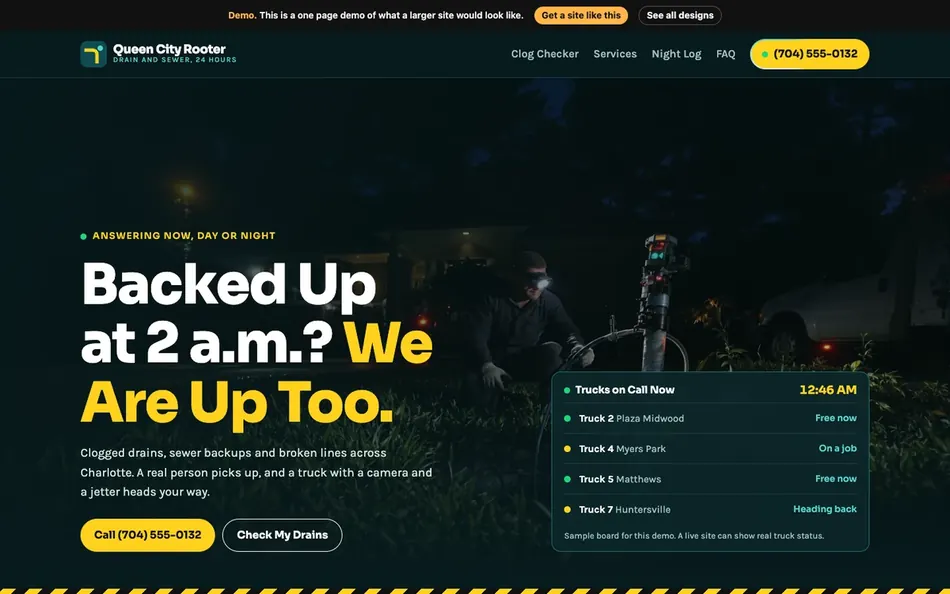
A landing page converts when a visitor on a phone sees what you do, where you do it, proof you are good, and a way to call, all before they scroll. Put a tappable phone number, a clear headline that matches the search, a real photo and a short form at the top. Make it load fast on a phone. Answer the top questions lower on the page. Then test one change at a time and let the numbers decide.
I wrote the first version of this post in March 2016. Back then I had to argue that mobile mattered. Today Google crawls and indexes the web as a phone, and most local customers find you on one. The ideas held up. The details got sharper.
Key points
- Above the fold needs a phone number, a headline, a real photo, a value point and a short form.
- Build for the phone first, then check the desktop.
- Hit Google's Core Web Vitals targets. LCP within 2.5 seconds, INP of 200 milliseconds or less, CLS of 0.1 or less.
- Every form asks for a phone number.
- One page, one goal, one change tested at a time.
What You'll Learn
Start With Who Is Landing
It is not about you. It is about the person who just clicked.
Before you touch a design, write one sentence about that person. "A homeowner in Riverside with a leaking roof, on their phone, after a storm." Now every choice on the page has a test. Does this help that person call me?
Most landing pages fail this test in the first screen. They open with a logo, a slider and "Welcome to our website." The homeowner with the leak does not care. They want to know if you fix roofs near them and how fast.
What Goes Above the Fold
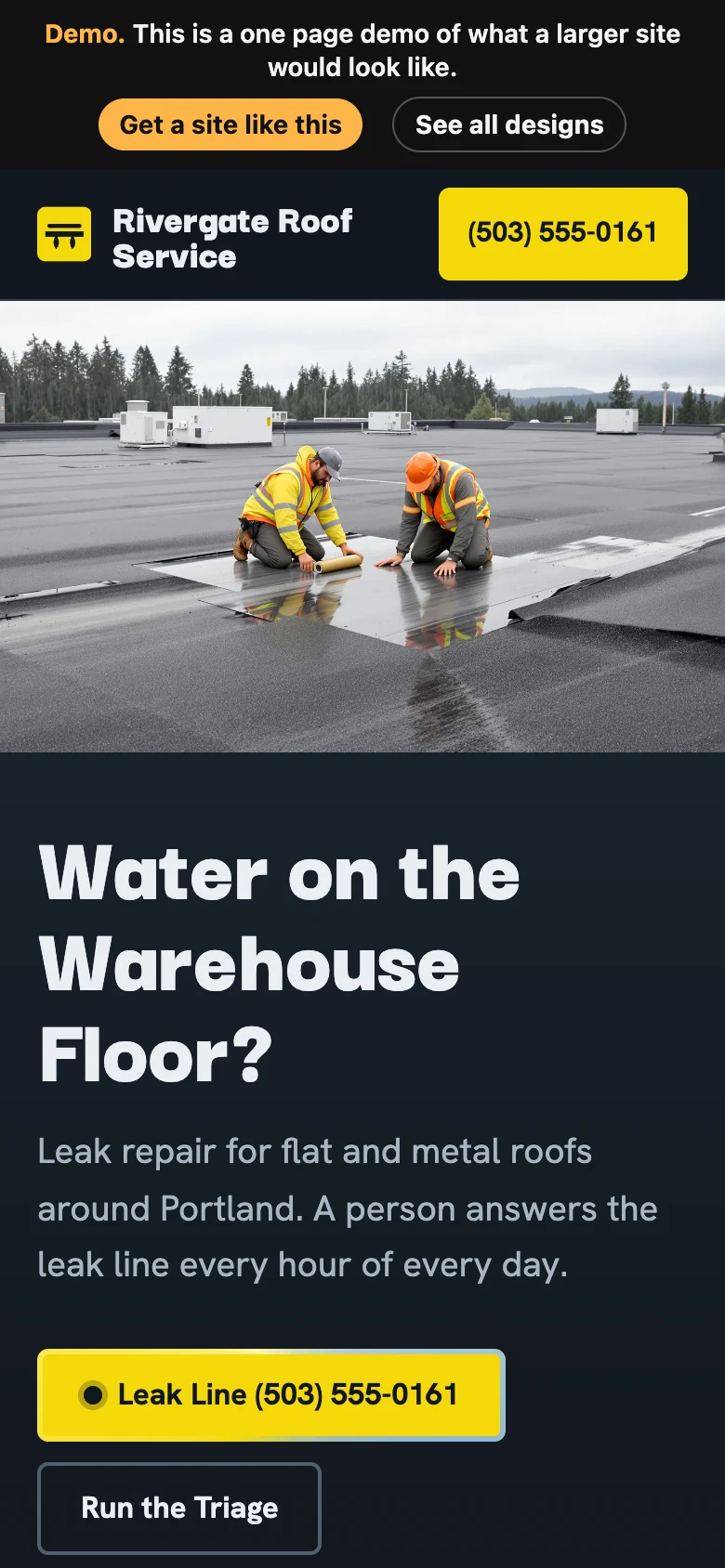
The fold is what someone sees before they scroll. On a phone, that space is small. Use it for the five things that make someone act.
| Above the fold | Why it matters |
|---|---|
| Tappable phone number | Most local leads still call |
| Headline that matches the search | Tells them they landed in the right place |
| A real photo of your work | Proves you are real |
| One value point | A reason to pick you, like same day service or a posted price |
| A short form | For people who will not call |
Leave out sliders, long intros and stock photos. They push the five things that matter below the fold.
Make the Phone Number Work
Every phone number on the page should start a call when tapped on a phone. That means a real tel link in the code, not just text. Test it on your own phone. You would be surprised how many sites get this wrong.
Match the Search
If someone searched "emergency plumber Hemet" and clicked your ad, the headline should say emergency plumber in Hemet. Not your company slogan. The closer the page matches the search, the more people stay.
Build for the Phone First
Why Mobile Comes First
Google announced on October 31, 2023 that its move to mobile first indexing was complete (Google Search Central blog). In plain words, Google looks at the phone version of your page to decide how it ranks. If your mobile page is missing content the desktop page has, Google may never see it.
How to Check Your Page on a Phone Screen
You can preview your page at phone sizes right in Chrome.
- Open Chrome DevTools with Control+Shift+I on Windows, or Command+Option+I on a Mac.
- Turn on Device Mode with Control+Shift+M on Windows, or Command+Shift+M on a Mac.
- Pick a few popular phone sizes and scroll the whole page.
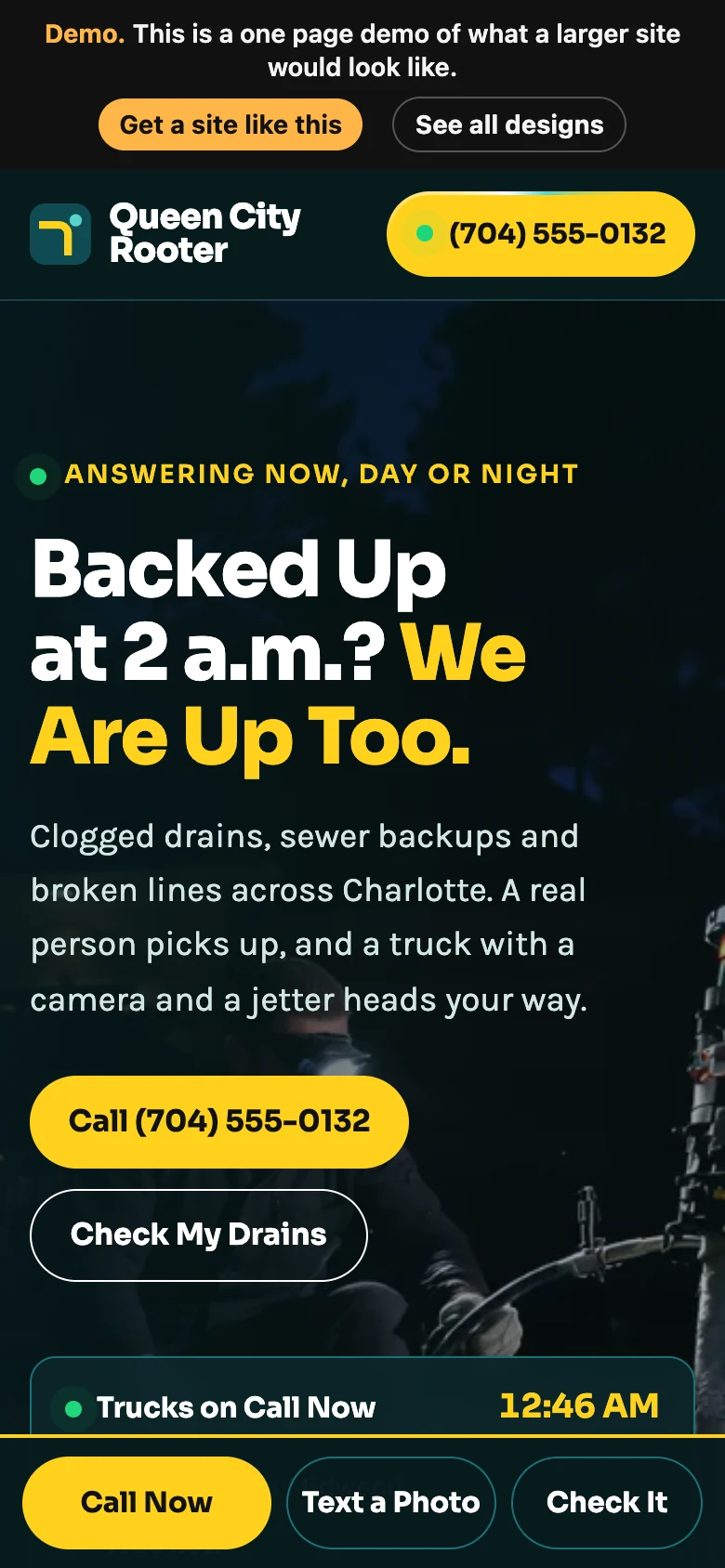
Look for text running off the edge, buttons stacked on top of each other, and a phone number that is not tappable. Check that the most important parts sit at the top.
Google's own docs say Device Mode is only a first order approximation of a real phone (Chrome DevTools, Device Mode). So after you check it in Chrome, open the page on your actual phone. Then hand it to someone else and watch them use it without helping.
Make It Fast
A slow page loses people before they read a word. Google measures page experience with three Core Web Vitals (web.dev, Web Vitals).
| Metric | What it measures | Good score | Poor score |
|---|---|---|---|
| Largest Contentful Paint (LCP) | How fast the main content shows up | Within 2.5 seconds | Over 4.0 seconds |
| Interaction to Next Paint (INP) | How fast the page reacts to a tap | 200 milliseconds or less | Over 500 milliseconds |
| Cumulative Layout Shift (CLS) | How much the page jumps around while loading | 0.1 or less | Over 0.25 |
The poor lines come from Google's own pages on LCP, INP and CLS. Anything between good and poor needs work.
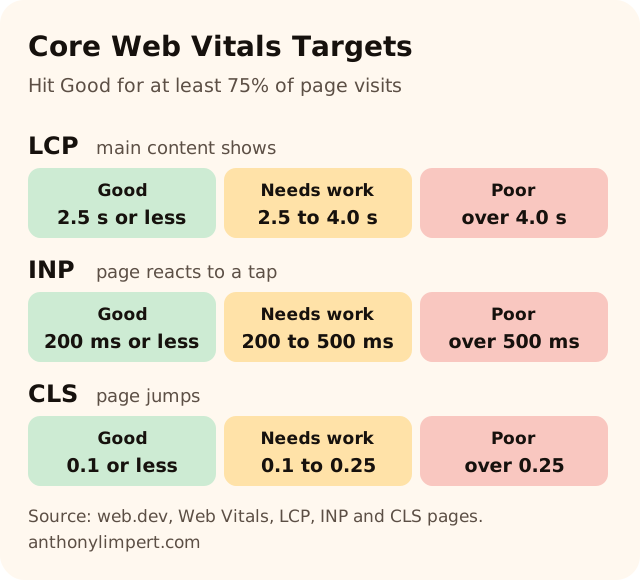
Google says to hit these for at least 75% of page visits (web.dev, Web Vitals). INP became a stable Core Web Vital in 2024, so older guides that talk about First Input Delay are out of date.
The common fixes for a local business site are simple.
- Size your images right and use a modern format like WebP.
- Load the hero image first and lazy load the rest.
- Cut plugins and scripts you do not use.
- Set width and height on images so the page does not jump.
Keep your photos clear. A sharp photo of real work sells better than a blurry one that loads a hair faster. Get the speed from everything else.
Forms That Keep the Lead
Always Ask for a Phone Number
An email only lead sits in an inbox and dies. A phone number lets you call or text back in minutes. Every form on every page I build asks for one.
Keep It Short
Name, phone, what you need. Maybe a ZIP code. That is it. Every extra field costs you leads. Ask the rest on the call.
Answer Fast
The page did its job when the form came in. Now it is your turn. At Supercanic, the auto repair company I started with Alaina Limpert, we tracked 11,531 inbound calls in the 12 months to October 17, 2026, by our own call tracking count. What that phone taught me is that the first business to reply with a real answer wins most of the work. My First Hour Rule guide covers missed call textback and speed to quote.
Build Trust on the Page
People do not call a business they do not trust. Show proof early.
- Real reviews with first names and details.
- Photos of your team, your trucks, your shop, your finished work.
- Licenses and certifications you really hold.
- A plain price range or "starting at" price when you can share it.
- Your city and service area in plain words.
Never fake any of it. One made up review or stock "team photo" can undo every real one on the page.
Answer the Questions Lower on the Page
Below the fold, answer the questions people ask before they call. How much does it cost? How fast can you come? Do you serve my town? What if I am not home?
This helps people decide, and it helps you show up in search. Google now shows AI Overviews and AI Mode answers on many searches. Google says there is no special markup needed to appear in those (Google Search Central, AI features). The page just has to be indexed and eligible to show with a snippet. Clear questions with short, direct answers are exactly what those features pull from. My FAQ Machine guide shows how I write them, and Get Every Page Indexed makes sure Google can find the page at all.
One Page, One Goal
A landing page should do one thing. Get the call or get the form. Remove anything that pulls people away. That usually means a lighter menu, no links to your blog, and no social icons at the top.
If you sell three services, build three landing pages. Each one matches its own search and its own ad.
Test One Change at a Time
You do not need hundreds of visits to spot a broken page. If nobody calls from your first hundred visits, something is wrong. Check that the phone number works, the form submits and the page loads on a phone.
Once the basics work, test one thing at a time.
- A new headline.
- A different hero photo.
- A price on the page versus no price.
- A shorter form.
Give each change enough traffic to judge it, and track calls, not just clicks. Write down what you changed and when. In a month you will know more about your customers than any guide can tell you.
Want my new posts near the top when you search? Pick Anthony Limpert as a preferred source on Google and Google shows them to you more often in Top Stories.
Ask the Shop
What should be above the fold on a landing page?
A tappable phone number, a headline that matches the search, a real photo of your work, one value point and a short form. Leave out sliders, long intros and stock photos.
How do I check if my landing page works on mobile?
Open Chrome DevTools and press Control+Shift+M on Windows or Command+Shift+M on a Mac to turn on Device Mode. Then check the page on a real phone, because Device Mode is only an approximation.
What are good Core Web Vitals scores?
Google says LCP within 2.5 seconds, INP of 200 milliseconds or less, and CLS of 0.1 or less, for at least 75% of page visits.
How many fields should a landing page form have?
As few as possible. Name, phone and what they need is enough for most local businesses. Always ask for a phone number so you can call or text back fast.
Do landing pages need FAQs?
They help. Answering common questions lower on the page helps people decide and gives Google clear answers it can show in search, including AI Overviews.
Your Checklist This Week
- Open your main landing page on your phone and check what shows before you scroll
- Tap every phone number on the page and make sure it starts a call
- Turn on Device Mode in Chrome and check three phone sizes
- Run the page through a Core Web Vitals test and note LCP, INP and CLS
- Cut your form down to name, phone and what they need
- Add five real customer questions with short answers below the fold
- Pick one change to test this month and write down the date
Want me to look at your page? Book a strategy call, browse my designs, or see how I work with businesses.
Official Sources
- web.dev, Web Vitals
- Chrome DevTools, keyboard shortcuts
- Chrome DevTools, simulate mobile devices with Device Mode
- web.dev, Largest Contentful Paint
- web.dev, Interaction to Next Paint
- web.dev, Cumulative Layout Shift
- Google Search Central blog, mobile first indexing has landed, October 31, 2023
- Google Search Central, AI features and your website