 Anthony
 Why Is My Business Not Showing Up On Google? The 8 Causes, In The Order I Check Them
Your business is not showing up on Google for one of eight reasons. The profile is not verified, it is suspended, it is a duplicate, it is too new, or your edits have not gone live yet. Or the profile is fine and you are searching from too far away, under the wrong category, or for your website instead of your map listing. Search your exact business name plus your city first. If it shows up, Google has you and the problem is ranking. If it does not, the problem is the profile itself.
I manage Google Business Profiles for our own auto repair shops and for client businesses. The most common call I get starts with "I searched and we are gone." Most of the time the business was never gone. The owner was searching for the wrong thing from the wrong spot. So below I start with the test that sorts that out in two minutes. Then I go cause by cause, worst first, with Google's own rules and timelines checked on October 19, 2026.
Key points
- Google says only verified businesses can show their info on Maps and Search.
- A suspended profile does not show to anyone but you until you fix it.
- A duplicate profile does not show on Search or Maps at all.
- New businesses can take up to a month to rank. Edits can take up to 3 days to show.
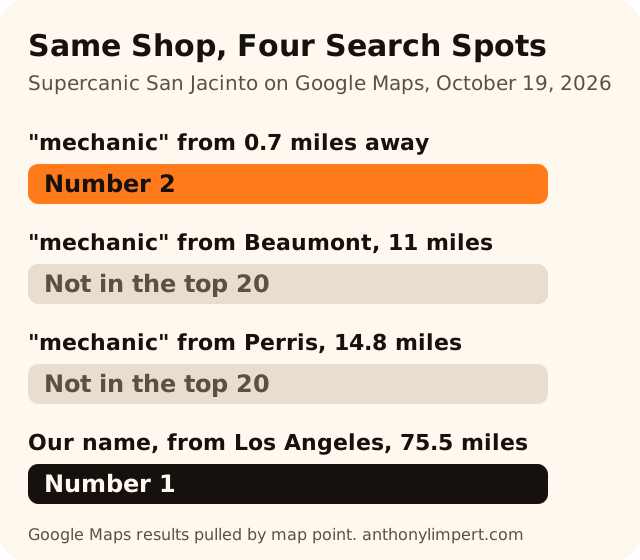
- Distance is one of Google's three local ranking factors. On October 19 our own shop ranked number 2 from 0.7 miles away and was not in the top 20 from 11 miles away.
- You cannot pay Google for a better map ranking. Google says so in writing.
What You'll Learn
Start Here. The Two Minute Test
Before you change anything, find out which problem you have. Changing a profile that is fine can cause the very problem you are trying to fix.
- Sign out of Google, or open a private window on your phone.
- Search your exact business name plus your city on Google and on Google Maps.
- Then search the service, like "mechanic" or "plumber", with no name.
Here is how to read what you see.
| What you see | What it means | Go to |
|---|---|---|
| Name search finds you, service search does not | Google has you. You are not ranking for that search from that spot | Cause 6, 7 and 8 |
| Name search finds you only when signed in | You are seeing the owner view. The public may not see you | Cause 1, 2 and 3 |
| Name search finds nothing at all | The profile is unverified, suspended, a duplicate or not made yet | Cause 1, 2 and 3 |
| Map finds you, but your website is missing from the blue links | That is a website problem, not a profile problem | Cause 8 |
| You just made the profile or changed it | Google is still processing it | Cause 4 and 5 |
Why sign out? Google's own help page says that to find your profile, you must sign in to the Google Account tied to it (Google Business Profile Help). That is the manager view. What you see signed in is not proof of what a customer sees.
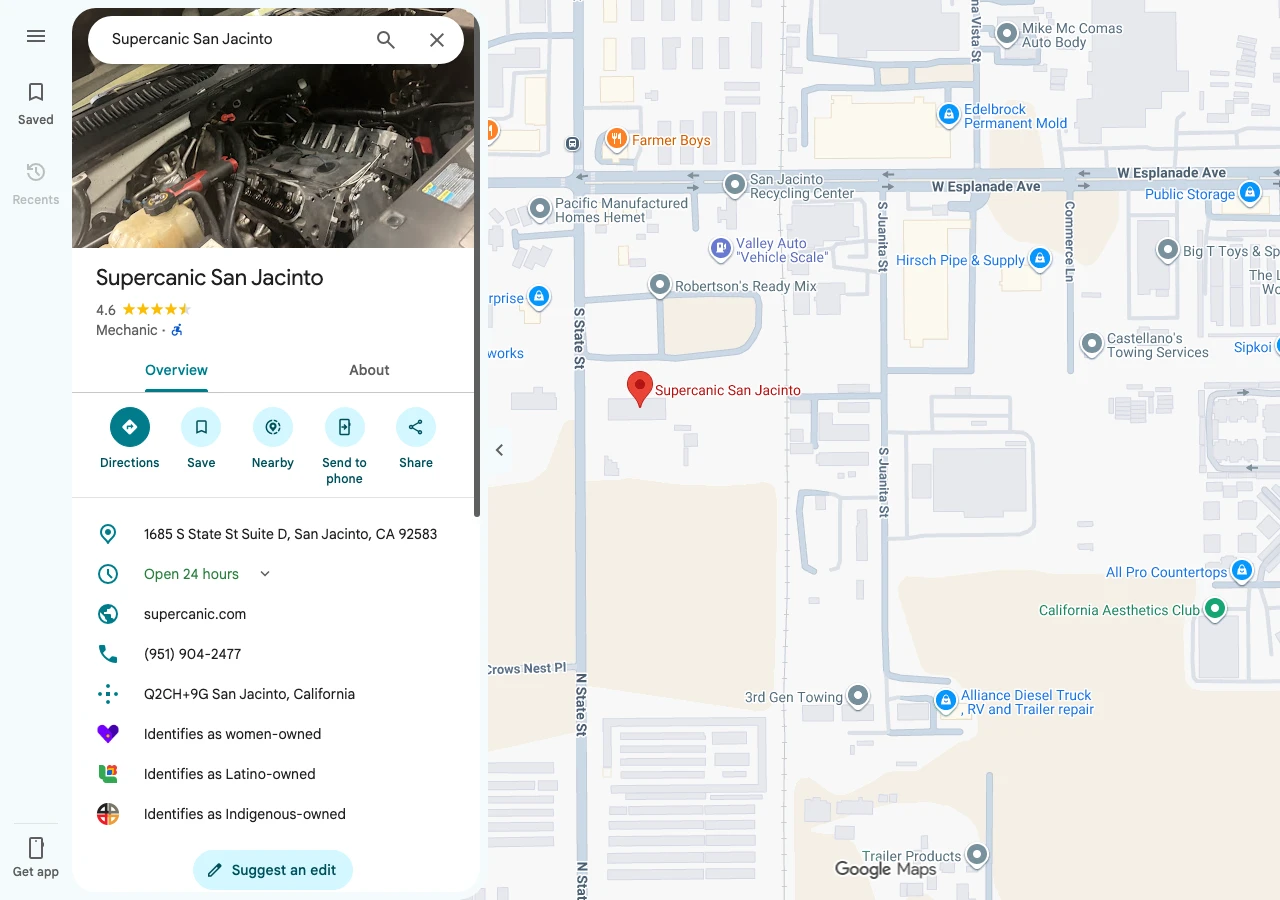
Here is what the public view looked like for one of our own shops when I ran this test by name.
Cause 1. Your Profile Is Not Verified
This is the most common cause I see on a brand new listing. Google's help page puts it plainly. Only verified businesses can show their business info on Maps and Search (Google Business Profile Help).
Google picks your verification method for you, and you cannot change it (Google Business Profile Help). Here is what each one involves.
| Method | What happens | Timeline from Google |
|---|---|---|
| Phone or text | Google sends a code | No time given |
| Google sends a code to your business email | No time given | |
| Live video call | You show your business on a call | Only during your business hours |
| Video recording | You film your location, signage and tools | Then the review below |
| Postcard | A code comes in the mail | Most arrive within 14 days. Codes expire after 30 days |
After you finish, Google says the review can take up to 5 business days, and longer on rare occasions (Google Business Profile Help).
The postcard trap. If you get impatient and request a new code, Google says that cancels the code already in the mail. Owners do this all the time and add two weeks to their wait. Request it once, then watch your mailbox.
The fix. Sign in at business.google.com. If you see a Get verified button, you are not done. Finish the step it gives you.
Cause 2. Your Profile Is Suspended Or Your Account Is Restricted
If your profile breaks Google's rules, Google says it becomes disabled or suspended and won't show to other users on Google until you resolve it (Google Business Profile Help). Google sends a notice to the account that manages it. Check that inbox, and check spam.
These are the rule breaks I see trigger it most, all straight from Google's guidelines (Google Business Profile Guidelines).
- Extra words in the name. Your name should be your real world name. Google says unnecessary info in the name could get the profile suspended. "Joe's Plumbing" is fine. "Joe's Plumbing Best 24 Hour Plumber Dallas" is not.
- A P.O. box or a virtual office. Google says P.O. boxes are not acceptable and a virtual office is not eligible.
- A phone or link that is not yours. The phone must be under the direct control of the business. Links that redirect people to some other page are not allowed.
- A service business showing a home address. If you do not serve customers at your address, Google says you should hide it.
The fix. Do not make a new profile. Google's appeal page says so directly (Google Business Profile Help). Fix the rule break first. Then file one appeal in Google's appeals tool with proof, like a business license, a utility bill or your business registration. Make sure the name and address on every document match the profile. Google says an appeal can only be submitted once, so make it count. Google emails you the result. It does not give a time frame.
If your whole account is restricted, every profile you manage is suspended. You have to clear the account first, then appeal the profile.
I will write a full suspension guide soon. For now, the short rule is this. One clean appeal with matching documents beats five angry ones.
Cause 3. Google Thinks You Are A Duplicate
Google allows one profile per business. Its duplicate page says a duplicate won't show on Google Search or Maps (Google Business Profile Help). Google flags it when there is already a verified profile for the same business, more than one profile at the same address, or more than one profile for different services of the same business.
This one hides well. Maybe an old manager made a second listing years ago. Maybe you moved and made a new one instead of editing the old one. Now Google sees two and shows neither, or shows the old one.
The fix. Search Maps for your name, your old name and your phone number. If you find a second listing you made by mistake, you can remove it without touching your verified one. If you find two real listings of the same business, suggest a merge on Google Maps. Google says reviews are combined in a merge, but replies to reviews may be lost. If someone else owns the listing, request access. The owner has 3 days to answer before you may be able to claim it.
If you moved, Google is clear. Update the profile you have. Do not make a new one.
Cause 4. You Are Brand New
Google's help page says rankings for new businesses can take up to a month to appear in search results (Google Business Profile Help). If you verified last week, your name search may work while service searches show nothing. That is normal.
The fix. Use the month. Fill every field, add real photos of your work and ask your first customers for reviews. A new profile with 10 honest reviews looks very different from one with none. My post on how many Google reviews a business needs shows how to set a target.
Cause 5. You Just Made A Big Change
Google says changes to your business info can take up to 3 days to appear (Google Business Profile Help). A new name, address or category can send a profile back into review. While it sits there, it can look like you dropped off the map.
The fix. Wait the 3 days before you touch anything else. Every new edit can restart the clock. If you must change your address, read Google's rules on moving first, and keep the same profile.
Cause 6. You Are Searching From Too Far Away
This is the cause behind most of the "we are gone" calls I get. Google ranks local results on three things (Google Business Profile Help).
- Relevance. How well your profile matches the search.
- Distance. How far your business is from the person searching.
- Prominence. How well known your business is.
Owners forget the second one. You search "plumber" from your house 12 miles from the shop and you do not see yourself. That does not mean Google dropped you. It means a dozen plumbers are closer to your house.
I tested this on our own shop on October 19, 2026. I pulled the Google Maps results for "mechanic" from four map points and looked for Supercanic San Jacinto, which has 116 reviews on its profile.
| Search point | Distance from the shop | Search | Where we showed up |
|---|---|---|---|
| Next to the shop | 0.7 miles | mechanic | Number 2 |
| Beaumont | 11 miles | mechanic | Not in the top 20 |
| Perris | 14.8 miles | mechanic | Not in the top 20 |
| Los Angeles | 75.5 miles | Supercanic San Jacinto | Number 1 |
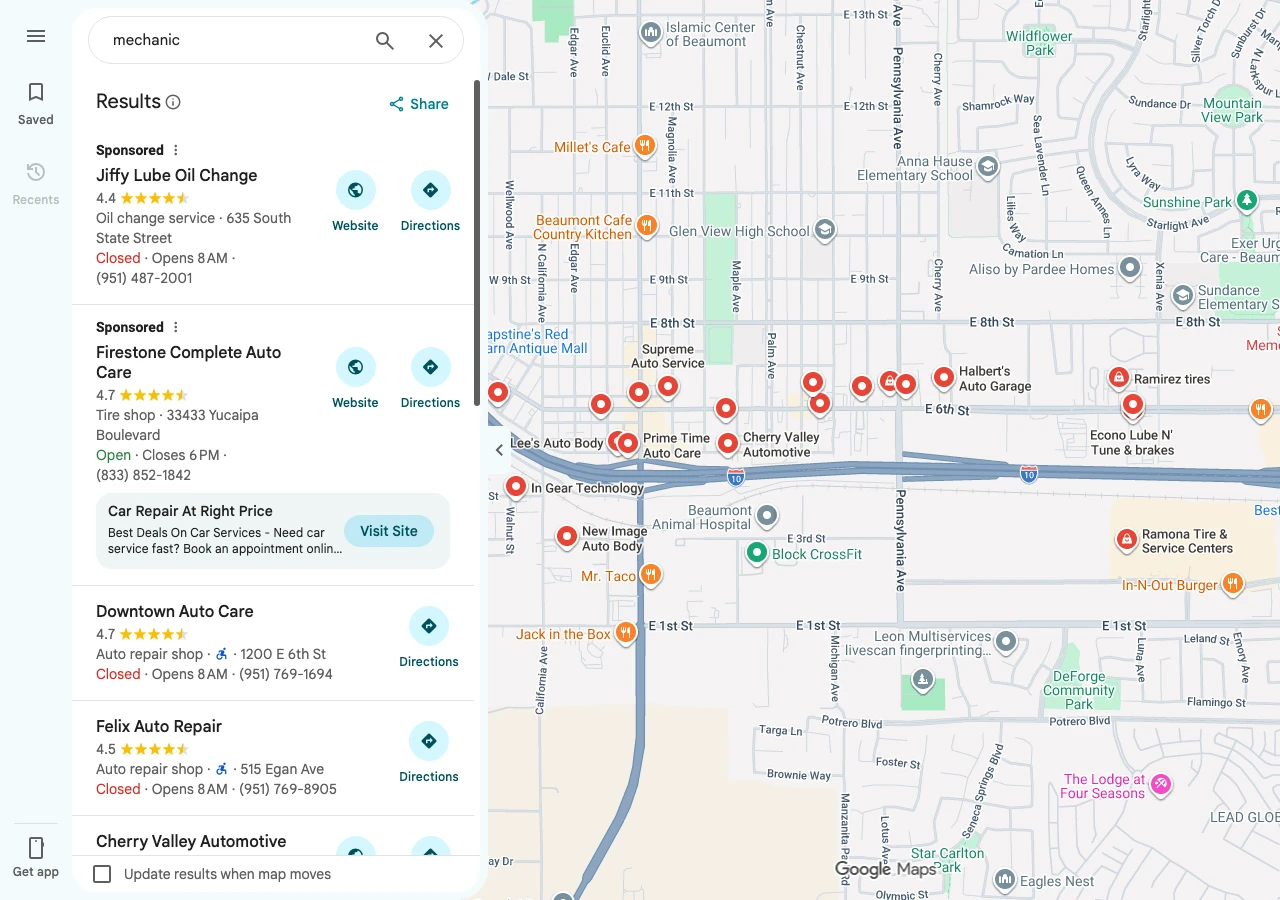
Same profile, same reviews, same day. From 11 miles out, all 20 results were businesses with Beaumont addresses.
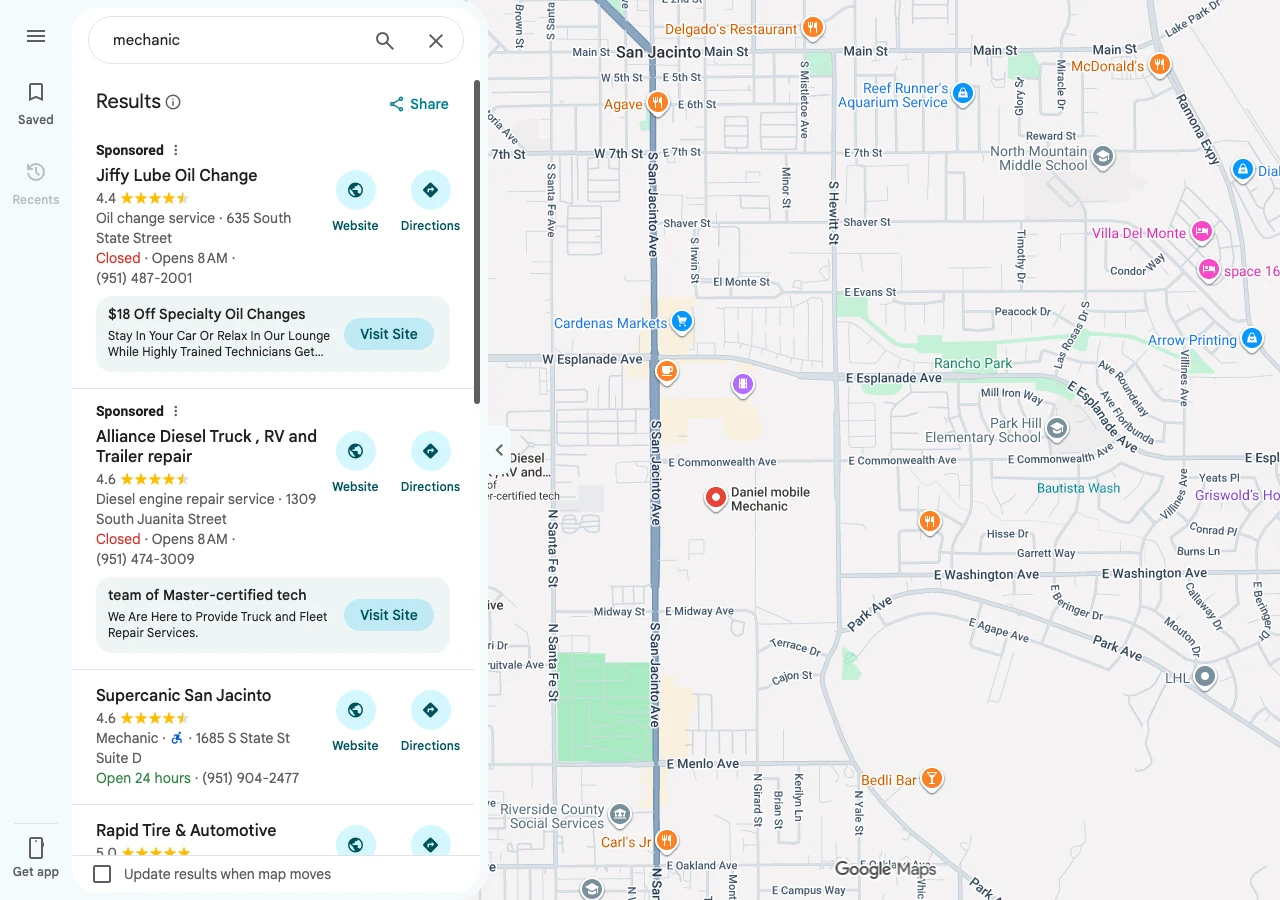
Here is what that looks like on screen. Near the shop, we are the first result after two paid ads.
Now the same search centered on Beaumont. We are nowhere on the list.
The fix. Stop judging your rank from your couch. Search your name to check that Google has you. To check service rankings, search from where your customers are, or use a rank grid tool that checks many points at once. If you serve a wide area, a service area business can list up to 20 service areas, and Google says the whole area should stay within about 2 hours of driving (Google Business Profile Help). Listing a town does not make you rank there. It only tells customers you go there.
Here is the part nobody likes. Google says there is no way to request or pay for a better local ranking (Google Business Profile Help). Ads can put you at the top, like the two Sponsored results in both screenshots. The free map spots you earn.
Cause 7. Your Category Does Not Match The Search
Relevance is the first of Google's three factors. Your primary category is the strongest relevance signal you control. Look at our profile above. It says "Mechanic" right under the name, and that is the word I tested.
If you are a roofer listed as "Contractor", you are asking Google to guess. If you are a mobile mechanic listed only as "Auto parts store", you will not show for "mechanic" at all.
The fix. Make your primary category the most specific one that is true. Add secondary ones for your other real services. Then make sure your website says the same thing in plain words on its main pages. My free Google Business Profile Playbook walks through categories, services and photos step by step.
Cause 8. It Is Your Website That Is Missing, Not Your Profile
Lots of owners mix these up. Your map listing and your website are two different things on Google. The map can be perfect while your website is not indexed at all.
Google's own check is the site search. Type site: and then your domain, like site:yourbusiness.com. Google says that shows pages it has indexed, but warns it does not always list them all. Google also says it can take a few weeks for it to notice a new site (Google Search Central).
The fix. Add your site to Google Search Console, submit your sitemap and inspect your main pages. My post on getting new pages indexed fast covers the full routine.
For scale, here is what that routine has done for us. Across the 77 sites we manage, Google Search Console shows about 24,000 clicks and 3.6 million impressions in the history we have stored, from June 2025 to October 14, 2026. None of that happens for a site Google never indexed.
What The Top Results Get Wrong
I read the pages ranking for this question on October 19, 2026. The number one result is from November 2024. It says changes take 3 days with no source and links to a Google Ads policy page for Business Profile rules. Another top result from April 2024 cites Quora for algorithm advice and never mentions that distance changes what you see. A September 2026 post splits the problem into four buckets, which is a good idea, but it cites no Google docs at all. And half the first page is Reddit and Facebook threads from people with the same question and no answer.
Not one of them told owners to sign out before they search. Not one showed what distance does to a real profile. That is the mistake that sends owners into panic edits, and panic edits are what get profiles stuck in review.
Want my new posts near the top when you search? Pick Anthony Limpert as a preferred source on Google and Google shows them to you more often in Top Stories.
Frequently Asked Questions
Why is my Google Business Profile only visible to me?
You are most likely signed in to the account that manages it, so you see the owner view. Sign out or use a private window and search your name plus your city. If you still do not show, check whether you are verified, suspended or flagged as a duplicate.
How long does it take for my business to show up on Google?
Google says verification reviews take up to 5 business days, edits take up to 3 days to show, and new businesses can take up to a month to rank. A postcard code alone can take up to 14 days to arrive.
Why did my business disappear from Google Maps?
The usual causes are a suspension, a recent edit that sent the profile back into review, or a duplicate that Google chose over yours. If none of those apply, check your rank from your shop address. You may have dropped for a service search while your name search still works.
Why is my business not showing up in Google search when I search the service?
Because Google ranks local results on relevance, distance and prominence. If you search from far away, or your category does not match the search, closer and better matched businesses show first. Your name search should still work from anywhere.
How do I make my Google Business Profile visible?
Finish verification, follow Google's guidelines on your name, address and phone, remove any duplicates, and pick the most specific true category. Then add real photos and ask happy customers for reviews.
Can I pay Google to show my business higher on Maps?
No. Google says there is no way to request or pay for a better local ranking. You can buy ads that show above the free results, but the free ranking is earned.
Does a P.O. box or virtual office work for a Google Business Profile?
No. Google says P.O. boxes are not acceptable and a virtual office is not eligible. If you work from home and go to customers, list as a service area business and hide your address.
Your Checklist This Week
- Sign out of Google and search your exact name plus city on Search and Maps
- Screenshot what you see so you have a before picture
- Sign in at business.google.com and look for Get verified or a suspension notice
- Search Maps for your old name, old address and phone number to find duplicates
- Remove extra words from your business name so it matches your sign
- Set the most specific true primary category
- Hide your address if customers never come to it
- Run a site: search for your domain to check your website is indexed
- Check your service search from where your customers live, not from home
- Wait 3 days after any edit before you change anything else
If you want me to look at your profile and tell you which of the eight it is, see how I work with businesses or book a 30 minute strategy call for $97.
Sources
- Google Business Profile Help, find your business on Google
- Google Business Profile Help, verify your business on Google
- Google Business Profile Help, fix suspended or disabled profiles
- Google Business Profile Help, resolve duplicate profiles and ownership issues
- Google Business Profile Help, tips to improve your local ranking on Google
- Google Business Profile Help, manage your service areas
- Guidelines for representing your business on Google
- Google Search Central, how to get your information on Google