 Anthony
Respond to Google Reviews in 4 Lines, 12 Replies to Copy
You just locked up for the night, and your phone buzzes with a new Google review. Maybe it's five stars from the lady whose brakes you did this morning. Maybe it's one star from a guy you never met. Either way, the move is the same. Reply from your verified Business Profile, in two to four short sentences, within a day or two. Thank them by name, mention the actual job, and sign it. Google's own help page lays out the clicks, which are Read reviews, then Reply, then type and post (Google Business Profile Help).
What You'll Learn
Know This Going In
- Your profile has to be verified before Google lets you reply.
- Owners and managers can both reply. The reply shows as your business, not as your personal name.
- Google checks every reply against its rules. Most post in about 10 minutes, and some take up to 30 days.
- The reviewer gets a notice when you reply, and they can still change their stars after that.
- Reply to the good ones too. Shoppers trust a business that answers everybody far more than one that only answers complaints.
How to Reply to a Google Review, Step by Step
Sign in with the Google account that owns or manages the profile. Then follow the steps from Google's review help page.
- Go to business.google.com, or search your business name on Google while signed in, so your profile tools show up.
- Select Read reviews.
- Find the review and select the Reply icon next to it.
- Type your reply in the box.
- Select Reply to post it.
The same steps work on a phone. Open your profile in the Google app or in a phone browser while signed in, then tap Read reviews. Button spots move around a little between the app and the browser, but the words stay the same.
To fix or remove a reply later
- Go back to your profile and select Read reviews.
- Under your reply, select Edit, change the text, and select Update.
- To remove it, select Delete, then Delete again.
Who gets to reply matters more than most owners think. Google's help page on managing reviews says both owners and managers can respond for the listing (Google Business Profile Help). So add your office manager as a manager on the profile. Never hand out your own Google password to get the replies done.
What Happens After You Hit Reply
Your reply doesn't go live the second you post it. Google reviews it first. If it breaks a rule, Google asks you to edit it (Google Business Profile Help).
| What happens | What Google says |
|---|---|
| Google reviews your reply | Usually up to 10 minutes, sometimes up to 30 days |
| Your reply goes live | It sits under the review and shows as your business, not your name |
| The customer hears about it | The reviewer gets a notice that you replied |
| The customer can change the review | They can edit it after reading your reply, and the review date updates |
| A customer posts a photo update | You can reply to that too. Photo updates don't change your star rating |
That notice to the reviewer is the quiet power move. A calm, useful reply lands in the inbox of the person who just left you three stars. Plenty of them come back and bump it up on their own.
Does Replying to Google Reviews Help Your Rankings?
Not in any way Google has promised. Google says local results come mainly from relevance, distance and prominence. It says more reviews and positive ratings can help your local ranking. About replies, it says something softer. Replying shows that you value feedback, and helpful replies can help your business stand out (Google Business Profile Help).
So treat replies as a sales tool first. The ranking help comes from the reviews themselves, and replies help you get more of them. The sales help is easy to measure. BrightLocal's 2026 survey of 1,002 US adults found that 89% of consumers expect owners to respond to reviews. 80% are likely to use a business that replies to all of its reviews (BrightLocal).
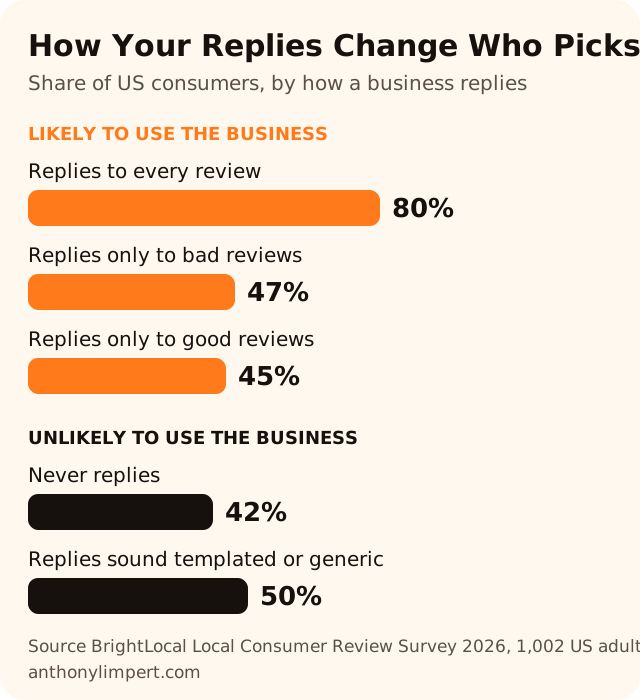
Look at the middle bars. Replying only to complaints, or only to praise, gets you about half the trust of replying to everyone. And 42% say they're unlikely to use a business that never replies. Customers read the whole pattern, not one reply.
The Four Line Reply That Fits Any Review
Google's own reply tips boil down to a short list. Keep it short and simple. Skip the generic thank you. Be conversational, not promotional. Use the reviewer's name, speak to what they said, and sign off with your name or initials (Google Business Profile Help).
Put that together and every reply has the same four lines.
- Their name and a real thank you. One line.
- The job. Name the actual work, like the brake job, the roof leak or the lockout.
- One useful thing. A tip, a fix, or what happens next.
- Your name. A first name tells the next reader a person wrote it.
The job line is the one that matters most for trades. On many service businesses, Google may ask customers which tasks you did, and that task shows inside their review (Google Business Profile Help). Read what they picked, then name that same job in your reply.
Replies to Copy for Five Star Reviews
Most of your reviews are five stars, so most of your replies are thank yous. Supercanic San Jacinto, an auto repair shop, has 116 Google reviews from November 2025 to October 2026. 102 of them are five stars. That's roughly ten a month, which is about twenty minutes of replies a month at two minutes each.
Swap the brackets for real details. Never post the same reply twice.
1. Mechanic or auto shop
Thanks, [Name]. Glad the [brakes] feel solid again. Those [front pads] were down to the metal, so you caught it just in time. Drive safe. [Your name]
2. Roofer
Thank you, [Name]. That [valley leak] was a tricky one, and we're glad you're dry before the rain. Keep an eye on the gutters this winter. [Your name]
3. Plumber or HVAC
Thanks, [Name]. Happy we got your [water heater] going the same day. Flush the tank once a year and it'll treat you right. [Your name]
4. Locksmith
Thanks for the kind words, [Name]. Nobody likes a [lockout at night]. Keep that spare key we cut somewhere safe outside the house. [Your name]
5. Cleaner or landscaper
Thank you, [Name]. The [back patio] was fun to bring back. See you on the [next visit]. [Your name]
6. A review that names one of your techs
Thanks, [Name]. We'll make sure [Tech] sees this. [He or She] takes pride in [getting it right the first time]. [Your name]
Notice what's missing. No coupon, no "call us for 10% off", no keyword stuffing like "best roofer in Hemet". Google's tips say not to use replies to offer deals (Google Business Profile Help). Stuffing city names reads like a robot wrote it, and the next customer can tell.
How Do You Reply to a 3 Star Review?
A three star review is a happy customer with one gripe. Thank them for what went right, own the one thing that didn't, and say what changed. Don't argue with the missing stars.
7. Three stars, the work was fine but it took too long
Thanks, [Name]. Glad the [AC] is cold again. You're right that the [part] took [three days] to show up, and we should have called you sooner. We now text every customer when a part is delayed. [Your name]
8. Three stars, a price surprise
Thank you, [Name]. The [repair] went past the first quote once we [opened it up], and we should have walked you through that before starting. We'd like to go over the invoice with you. Call [phone] and ask for [Your name]. [Your name]
9. Four stars, nothing to fix
Thanks, [Name]. We'll take four stars all day. Anything we could do better next time, just tell us. [Your name]
Replies to Copy for One Star Reviews
Bad reviews get their own playbook, with templates for the five most common complaints. Read the full post on how to respond to negative reviews before you answer a tough one. If the review breaks Google's rules, the guide on how to remove bad Google reviews covers reporting and the appeal.
Even a strong shop gets them. Supercanic San Jacinto holds a 4.6 on Google, and 12 of its 116 reviews are one star. So have two replies ready.
10. A real mistake
[Name], you're right, and we're sorry. [The car wasn't ready when we said it would be.] That's on us. Please call [phone] and ask for [Your name] so we can make it right.
11. Someone you can't find in your records
Hi [Name]. We can't find a visit under this name or number, and we'd like to help. Please call [phone] with the date of your visit so we can look into it. [Your name]
Keep both short. Never call the reviewer a liar, and never fire back. The reply is for the next hundred people who read it.
What About Reviews With Stars and No Words?
Reply to those too. They're the easiest replies you'll write. 8 of Supercanic San Jacinto's 116 reviews are stars with no text. Each one still sits on your profile, and an answer shows every reader that a person is watching.
12. Stars only
Thanks for the five stars, [Name]. Glad we could help. [Your name]
If it's a one star with no words, use reply 11. You can't fix what you can't see, so ask them to call.
How Fast Should You Reply?
Within a day or two. BrightLocal's 2026 survey found 19% of consumers expect a same day reply and 32% expect one by the next day. 81% expect a reply within a week (BrightLocal). Google's tips say the same thing in plain words. Respond promptly (Google Business Profile Help).
The easy way to keep up is a set time. Pick the first ten minutes after you open, or the last ten before you close. Turn on review notices in your profile so new ones hit your phone.
Old reviews count too. If you've never replied, start with the last 90 days and work backward a few a day.
Should You Use AI to Write Your Review Replies?
Use it for a first draft, then make it yours. BrightLocal found 50% of consumers are unlikely to choose a business whose replies are templated or generic (BrightLocal). AI drafts tend to sound exactly like that. "We truly appreciate your kind words and look forward to serving you again" fits every business on earth, which is the problem.
So give the AI the details, or skip it. Paste in the review, the job, the tech's name and one tip. Then cut the draft down to four lines and read it out loud. If it doesn't sound like you at the counter, rewrite it.
What Never to Put in a Review Reply
Google holds replies to the same content rules as everything else on Maps. Those rules ban personal information, harassment, and advertising or solicitation (Google's prohibited content policy). For a service business, that means a few hard lines.
- Customer details. No license plate, VIN, home address, invoice total or what you found in their house.
- Offers. No discounts, coupons or "mention this review" deals.
- A trade for a better review. Google bans offering anything to get a review changed or removed (Google Business Profile Help).
- Your staff as reviewers. Reviews from employees and family count as a conflict of interest under Google's rules. Don't have them post, and don't reply to fake praise as if it were real.
- Arguments. If you're mad, wait a day. You can edit or delete a reply, but the reviewer already got the notice.
Your Checklist This Week
- Make sure your Business Profile is verified, then add your office manager as a manager.
- Reply to every review from the last 30 days, five stars first.
- Write your four line reply for the jobs you do most, and save them as starting drafts.
- Pick a ten minute reply time each day and put it on the calendar.
- Turn on review notices on your phone.
- Go back through older reviews, a few a day, until every one has an answer.
Want the whole review system set up, from the ask to the reply habit? The Google Business Profile Playbook walks through it, or work with Anthony and have it done for you.
Connected Guides
- How many Google reviews a local business needs
- How mechanics can get more Google reviews
- How to respond to negative reviews
- Why your business is not showing up on Google
Official Sources
- Google Business Profile Help, manage customer reviews
- Google Business Profile Help, tips to get more reviews and reply tips
- Google Business Profile Help, read and reply to reviews on Google
- Google Business Profile Help, about reviews for service businesses
- Google Business Profile Help, tips to improve your local ranking
- Google Maps user contributed content policy, prohibited and restricted content
- BrightLocal, Local Consumer Review Survey 2026
Want my new posts near the top when you search? Pick Anthony Limpert as a preferred source on Google and Google shows them to you more often in Top Stories.