 Anthony
 How To Add Your Business To Apple Maps (Now That Business Connect Is Apple Business)
You add your business to Apple Maps for free at business.apple.com. Apple Business Connect does not exist anymore. Apple folded it into a new free platform called Apple Business, which launched on April 14, 2026. You sign up, verify your organization with two proofs, add or claim your location, and then fill out the place card. That same place card is what Apple shows in Maps, Wallet and Siri.
I set up and manage map listings for our own auto repair shops and for client businesses. Most of the Apple Maps guides on the first page of Google still say "Business Connect", and one of them is from 2020. So I walked through Apple's own new help pages on October 18, 2026, and checked every step and limit below against them.
Key points
- Apple Business replaced Apple Business Connect. Your old claimed locations, place cards and photos moved over on their own.
- It is free. The old businessconnect.apple.com address now sends you to business.apple.com.
- You verify your organization with two methods, like an EIN plus a DNS record. Apple says that can take up to five business days.
- Already on Maps? You can often claim the spot with a phone call and a four digit code.
- After that, you can add photos, Showcases and Action links. Apple reviews each one before customers see it.
- Ads on Apple Maps ban home services like plumbing, roofing and locksmiths. The free place card is still open to them.
What You'll Learn
What Changed In 2026
On March 24, 2026, Apple announced Apple Business. It is one platform that rolls up three older ones. Those are Apple Business Manager, Apple Business Essentials and Apple Business Connect (Apple Newsroom).
This is what that means for a local business.
- The name changed. Apple's old Business Connect help guide now opens with one line. It says Apple Business Connect is now Apple Business (Apple Support).
- The price did not. Apple says the platform is free for new and existing users. The paid add ons are iCloud storage and AppleCare+ for Business, and you do not need either one to manage a map listing.
- Your data moved. Apple says claimed locations, place cards and photos from Business Connect migrate on their own.
- It launched April 14, 2026, in more than 200 countries and regions.
When we loaded the old businessconnect.apple.com address on October 18, 2026, it sent us straight to the new Apple Business home page.
Why Apple Maps Is Worth An Hour Of Your Time
Most owners I talk to have never looked at their Apple Maps listing. They check Google and stop. That is a mistake for one simple reason. Apple's own iPhone guide says Apple Business helps customers find your business in Apple Maps, Wallet, Siri and more (iPhone User Guide).
Picture a driver asking Siri for the nearest shop, or a customer on CarPlay, where Apple Maps runs on the car's own screen (Apple CarPlay). None of that runs through Google. When Apple launched Business Connect in 2023, it said place card info reaches more than a billion Apple users across Siri, Wallet and Messages (Apple Newsroom, 2023).
This is my own number for scale. Across the 76 sites we track in Google Search Console, Google sent 21,997 clicks in the last 12 months, from October 15, 2025 to October 14, 2026. Not one of those clicks tells me what happened on Apple Maps. Apple keeps its own stats in Apple Business Insights. If you never claim the listing, you never see them.
Step 1. Check Whether You Are Already On Apple Maps
Before you sign up, open Apple Maps and search your business name. You will land in one of three places.
- You are there and nobody claimed it. Apple built your place card from other data. You will claim it in Step 4.
- You are there and someone else manages it. That could be an old agency or a past owner. Apple has a transfer request for this, also in Step 4.
- You are not there at all. You will add a new location in Step 4.
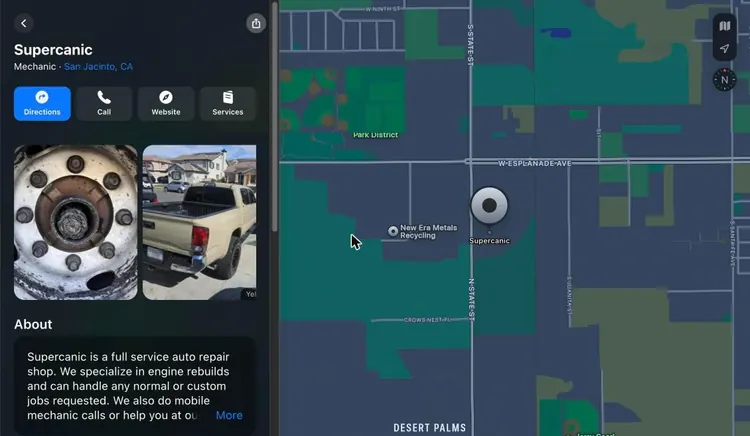
This is the Apple Maps place card for one of our own Supercanic shops in San Jacinto.
Look at the two photos. See the small Yelp label in the corner? Apple pulled those photos from Yelp. A wheel hub and a truck in a driveway are not the shots I would pick to sell our shop. Until you upload your own photos in Apple Business, Apple fills the card with whatever it can find. That alone is a reason to claim your listing.
If you spot a wrong detail and do not want to sign up yet, any iPhone user can flag it. In Maps, tap your picture or initials, tap Reports, then tap Report a New Issue (iPhone User Guide). That is a request, not control. Claiming the listing is how you get control.
Step 2. Sign Up For Apple Business
Go to business.apple.com and choose to sign up. If you already used Business Connect, sign in with the same account instead.
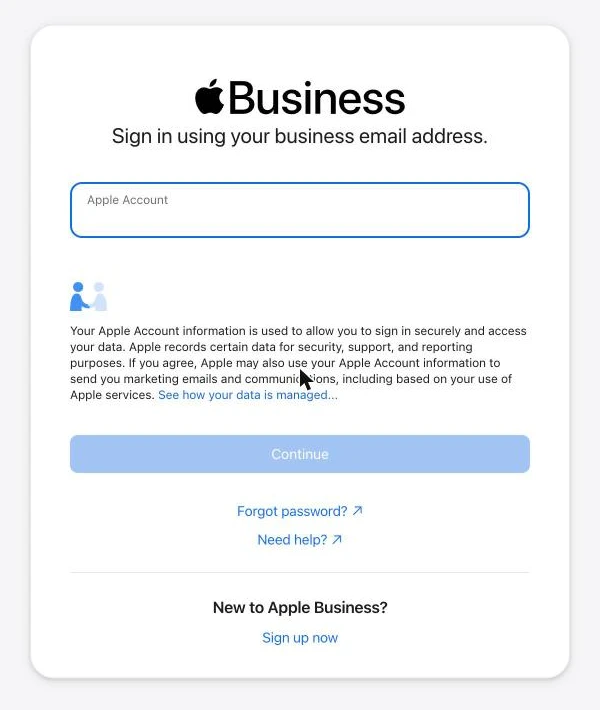
Apple's sign up page lists the steps (Apple Business User Guide).
- Enter your organization name, address and website. Apple says the website is optional, but it can speed up verification.
- Enter the legal name of the person signing. It has to be a real human name. Apple sends back titles like "IT Coordinator" for a fix.
- Add a phone number and pick text or call to confirm it.
- Enter the codes Apple sends to your email and your phone.
- Accept the Apple Business terms.
Leave the agency box unchecked unless you really are an agency. And if you sign in with a personal Apple Account from the Business Connect days, Apple limits you to brand and location tools.
Step 3. Verify Your Organization
This is the step that trips people up, and the old guides skip it. Apple asks for two verification methods, not one (Apple Business User Guide). In Apple Business, go to Settings, then Organization, then Verify Now. Pick one method, then a second, then send it for review.
| Method | What you give Apple | My note |
|---|---|---|
| Business ID | A D-U-N-S Number or your EIN | Most owners already have an EIN. Fastest pick for most |
| Domain validation | A TXT record added to your DNS | Easy if you or your web person can reach your domain settings |
| Official documents | A business license, seller's permit, health permit, lease or utility bill | Good backup. Make sure the name matches what you typed |
| App Store Connect | Your developer account | Only if you publish an app. Not open to agencies |
Apple says verification can take up to five business days, and longer when volume is high. Nobody mentions one part. You have 60 days to get verified. If you miss it, Apple says it deletes the organization and its data. Do not start this the week before a vacation.
Make sure your email filters allow mail from apple.com. Apple sends the result by email, and a spam filter can eat it.
Step 4. Add Or Claim Your Location
In Apple Business, go to Brands, then Locations, then Add Location, then Add single location (Apple Business User Guide). Type your business name. Now it splits three ways.
If Apple shows your business. Pick it, check the map marker and enter your details. If verification by phone is offered, Apple calls the number it already has on file for that spot. You enter the four digit code from the call and you are done. If you do not know the number Apple has, contact Apple Business support. Do not guess.
If it says "already managed." Someone else claimed it. Add it anyway, then find it under Locations and choose Request Transfer. Explain why it should be yours and attach proof, like a business license or utility bill. Apple says a review can take up to five business days.
If your business is not there. Choose to add a new location with your name. Enter the address. Then drag the map until the pin sits right on your building. Apple's guide suggests the Satellite or Hybrid view so you can see the entrance. Its location rules say the pin goes on top of the building, not on the street or sidewalk (Apple Business User Guide).
Then you fill in the basics.
- Default language
- Display name
- One primary category
- Status, either Open or Opening Soon (up to six months out)
- Phone number with country code
- Website, or a Facebook, Instagram or TikTok page
- Hours
A note for mobile and service area businesses. Every step in Apple's guide is built around a street address and a pin on a building. On October 18, 2026, I could not find a way in Apple's guide to hide the address the way Google allows. If you work from home, think hard before you list that address in public.
Step 5. Fill Out Your Place Card Like You Mean It
A claimed but empty listing is barely better than an unclaimed one. Open your location, select Info, and work through every field.
Display name. Apple wants the name on your sign or your website. No keyword stuffing, and no symbols like ® or ™. A city name is only allowed if it is part of your real brand name. So "Joe's Plumbing Best Plumber Dallas" will not pass, and it should not.
Categories. You get one primary category plus up to 19 more. Make the primary one as specific as you can. Our San Jacinto card shows "Mechanic" right under the name. That one word decides which searches you show up for.
Phone and website. Apple says the phone number must be the one on your official website, with the country code and no extension. Your website has to be your own site or a social page. A third party site is not allowed, so do not point it at a directory listing.
Hours. Set normal hours, then add special hours for holidays. Apple asks you to list the times you are open, not the times you are closed. Keep them the same as your website.
Good to Know. This is the list of icons near the bottom of the card. It covers payment methods and amenities, like Apple Pay, contactless pay, parking, accessible parking, gender neutral restrooms and EV charging.
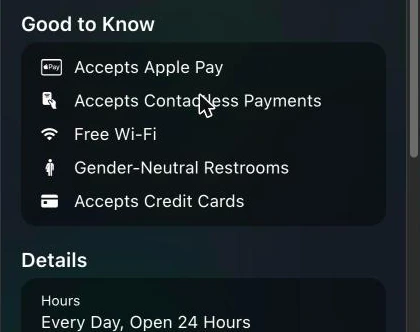
Fill in every item that is true. Skip the ones that are not.
About. Write what you do and where you work. Keep it short for a phone screen.
Header. Upload your logo and a cover photo. Apple reviews both before they show up.
One more thing to watch. Apple can change your name, status or hours after a customer report. Apple says it emails you when it does, and you can accept or contest the change (Apple Business User Guide). If that email lands in spam, a "permanently closed" flag can sit there for weeks.
Photos That Pass Apple Review
Apple is much stricter about photos than Google. Read these rules before you upload, or you will burn days waiting on rejections.
| Photo type | Minimum size | Notes |
|---|---|---|
| Location photos | 720 x 960 | Apple's standards cap a location at 100 photos |
| Cover photo | 1600 x 1040 | Cropped 2.5 to 1 for Maps. Also used in Wallet |
| Showcase photo | 492 x 492 | Needs alt text, 100 characters max |
| Brand logo | 1024 x 1024 | Can also be an SVG |
The max size for all of them is 4864 x 4864, in HEIF, JPEG or PNG (Apple Business User Guide).
Apple's photo standards ban a long list of things (Apple Business User Guide).
- No text on the photo, in any language
- No added borders or graphics
- No stock photos, clip art or illustrations
- No collages, watermarks or QR codes
- No date stamps
- No heavy filters or edits
- No AI generated images
- People only with their permission
Apple says each photo review can take up to three business days. My advice is simple. Use real photos of your real work and your real place, shot in good light on a phone. That is what Apple wants, and it is what customers trust. It also kicks the Yelp photos off your card.
Showcases. Your Free Promo Spot
A Showcase is a small promo box on your place card. Use it for a seasonal deal, a new service or anything you want a nearby customer to see first (Apple Business User Guide).
| Showcase rule | Limit |
|---|---|
| Heading | 38 characters |
| Body | 100 characters |
| Photo alt text | 100 characters |
| How long it runs | Up to 365 days, 90 days by default |
| Apple review | Up to 3 calendar days |
Send it at least three days before you want it live. If you edit it while it is in review, you can slow it down.
This is an example Showcase I wrote to fit the limits for a repair shop.
- Heading. "Free Brake Check With Any Oil Change" (36 characters)
- Body. "Same day in most cases. Tap Book to pick a time that works for you." (67 characters)
Action Links. Put A Book Button On The Map
Actions are buttons on your place card that go to your booking, ordering or quote page (Apple Business User Guide). The first one you make becomes your Primary Action. It sits right next to your website button. Others show under More.
A few rules from Apple.
- Customers need iOS 17.4 or later to see them.
- Apple approves each one, and that can take up to three business days.
- One link cannot be used for two action types.
For a service business, point it at a booking or quote form that takes a phone number, not your home page.
Insights. See What Apple Maps Is Doing For You
Once a location is verified, Apple Business shows what customers do with your card (Apple Business User Guide).
- How many people tapped you in search, and whether they searched your name or a category
- Place card views
- Taps on Directions, Website, Call, Share, Photos, your Showcase and your Actions
- A heat map of where searches and direction requests came from, by month
- How you compare with similar places nearby
Apple shows small numbers as zero for privacy, so judge a full month, not a week.
Ads On Apple Maps And The Home Services Ban
Apple Business also runs ads on Apple Maps for the US and Canada. In its March 24, 2026 release, Apple said they would start "this summer" and show at the top of search results and in a new Suggested Places section (Apple Newsroom). Apple's guide says you must claim and verify your locations first. It also says some new advertisers may get a one time $150 sign up credit (Apple Business User Guide).
Now the catch that matters for trades. Apple's ad policy has a section just for Apple Maps. It bans ads that promote home services, and it names plumbing, electrical, locksmith, HVAC, pest control, roofing and general contracting. It also bans bail bond ads (Apple Advertising Policies). Search Engine Journal reported the change on July 17, 2026 (Search Engine Journal).
So if you run a home service business, you cannot buy your way to the top of Apple Maps. Your free place card is the whole game. That makes a complete, verified listing with real photos worth more to you, not less.
Three Traps in Older Advice
A lot of the advice online about this is out of date.
- The old names. One of the top guides is from April 2020 and points owners to "Apple Maps Connect." Others still walk you through Business Connect menus.
- One step of verification. Most skip the two method rule and the 60 day deadline. That deadline is how an owner loses a claim they started.
- No word on the ad ban. If you are a roofer reading a guide that says "then run Maps ads," you are about to waste an afternoon.
If you want the same work done on Google, where most of your map calls still come from, my Google Business Profile Playbook covers it step by step. And if a bad review is what is holding the Google side back, read how to remove bad Google reviews.
Want my new posts near the top when you search? Pick Anthony Limpert as a preferred source on Google and Google shows them to you more often in Top Stories.
Ask the Shop
Is Apple Business Connect still available?
No. Apple replaced it with Apple Business on April 14, 2026, and moved your claimed locations, place cards and photos over on their own.
Is it free to add my business to Apple Maps?
Yes. Apple says Apple Business is free. Ads on Apple Maps cost money, but you do not need them to be listed.
How long does it take to get on Apple Maps?
Organization verification can take up to five business days. Photos and Actions can take up to three business days each to approve, and Showcases up to three calendar days. I plan on about two weeks from sign up to a full place card.
Do I need a D-U-N-S Number for Apple Business?
No. A D-U-N-S Number is one choice for the Business ID method. An EIN works for the same method. You still need a second method too, like a DNS record or a business license.
How do I verify my business on Apple Maps?
Verify your organization with two methods. If your business already shows on Maps, Apple may call the number it has on file with a four digit code.
Can I add my business to Apple Maps without a storefront?
Apple's steps are built around a street address and a pin on a building. As of October 18, 2026, I found no option in Apple's guide to hide your address.
Does Apple Maps use Yelp?
Yes, for some content. Our own San Jacinto place card showed photos marked with a Yelp label before we uploaded our own. Upload your own photos in Apple Business so the card shows your work.
Can home service businesses advertise on Apple Maps?
No. Apple's ad policy bans Apple Maps ads that promote home services, including plumbing, electrical, locksmith, HVAC, pest control, roofing and general contracting. You can still claim and fill out your free place card.
Your Checklist This Week
- Search your business name in Apple Maps and screenshot what shows today
- Sign up or sign in at business.apple.com
- Verify your organization with two methods, like your EIN and a DNS record
- Add or claim your location and set the pin on your building
- Match your display name, phone, hours and website to your own site
- Pick the most specific primary category and add the others that fit
- Fill in every true Good to Know item
- Upload a logo, a cover photo and at least five real photos of your work
- Add one Action that goes to a booking or quote form
- Put a calendar reminder to check Insights in 30 days
If you want me to look at your maps and tell you what I would fix first, see how I work with businesses or book a 30 minute strategy call for $97.
Official Sources
- Apple Newsroom, Introducing Apple Business, March 24, 2026
- Apple Support, Apple Business Connect is now Apple Business
- Apple Business User Guide, sign up and verify your organization
- Apple Business User Guide, add a single location
- Apple Business User Guide, configure location attributes
- Apple Business User Guide, maintain location information accuracy
- Apple Business User Guide, add, edit or delete photos
- Apple Business User Guide, photo and text standards
- Apple Business User Guide, create your first showcase
- Apple Business User Guide, about Actions
- Apple Business User Guide, insights for a single location
- Apple Business User Guide, promote your business on Apple Maps
- Apple Advertising Policies, additional prohibitions for Apple Maps
- iPhone User Guide, report an issue with Maps
- Apple Newsroom, Introducing Apple Business Connect, January 11, 2023
- Apple CarPlay
- Search Engine Journal, Apple Maps ads ban home services, July 17, 2026