 Anthony
 How to Rank Higher on Google Maps Past Your Own Block
You search your trade on your phone from the shop lot and you're right there in the top three. Then a customer across town says she couldn't find you at all. You're both right. Google Maps doesn't give your business one rank. It ranks you fresh for every search, based on where that phone is. To rank higher on Google Maps, fix what Google reads on your profile first, then build the kind of fame that pulls you onto screens farther from your door.
What You'll Learn
Know This Going In
- Google says local results come down to three things. Relevance, distance and prominence (Google Business Profile Help).
- You can't pay Google for a better map rank. Google says so in plain words on the same page.
- Distance is the one you can't change. A shop that ranks first at its door can be gone 3 miles away.
- Inside your radius, the primary category, being open, and real written reviews carry the most weight.
- To reach farther, you need prominence. Links, mentions and steady reviews over months.
- Stuffing keywords into your business name can work for a while. It's also one of the fastest ways to get a profile suspended.
Google Ranks You From the Searcher's Phone
Google's own help page names the three factors, and it's short. Relevance is how well your profile matches the search. Distance is how far you are from the person searching, or from the place they typed. Prominence is how well known you are, based on things like links to your site and your reviews (Google Business Profile Help).
Most advice treats those three as equal. They aren't. Distance sets the ceiling. Relevance and prominence decide where you land under it.
Look at what a survey of 47 local search experts ranked as the top Maps factors in Whitespark's 2026 report. The top two were the primary category and how close the address is to the person searching (Whitespark). That's an expert survey, not Google's code. But it matches what any rank grid shows.
| Whitespark rank | Factor | Which of Google's three |
|---|---|---|
| 1 | Primary Business Profile category | Relevance |
| 2 | Address close to the person searching | Distance |
| 3 | Keywords in the business name | Relevance (and a guideline risk) |
| 4 | Physical address in the city searched | Distance |
| 5 | Business open at the time of the search | Relevance |
| 6 | High star rating | Prominence |
| 7 | Address shown, not a hidden service area | Distance |
| 8 | Additional categories | Relevance |
| 9 | Number of Google reviews with text | Prominence |
| 10 | Map pin in the right spot | Distance |
Four of the top ten are about where you are. You can't move your building. So the work is the other six, plus making your fame big enough to beat closer shops.
One Shop, Nine Search Points
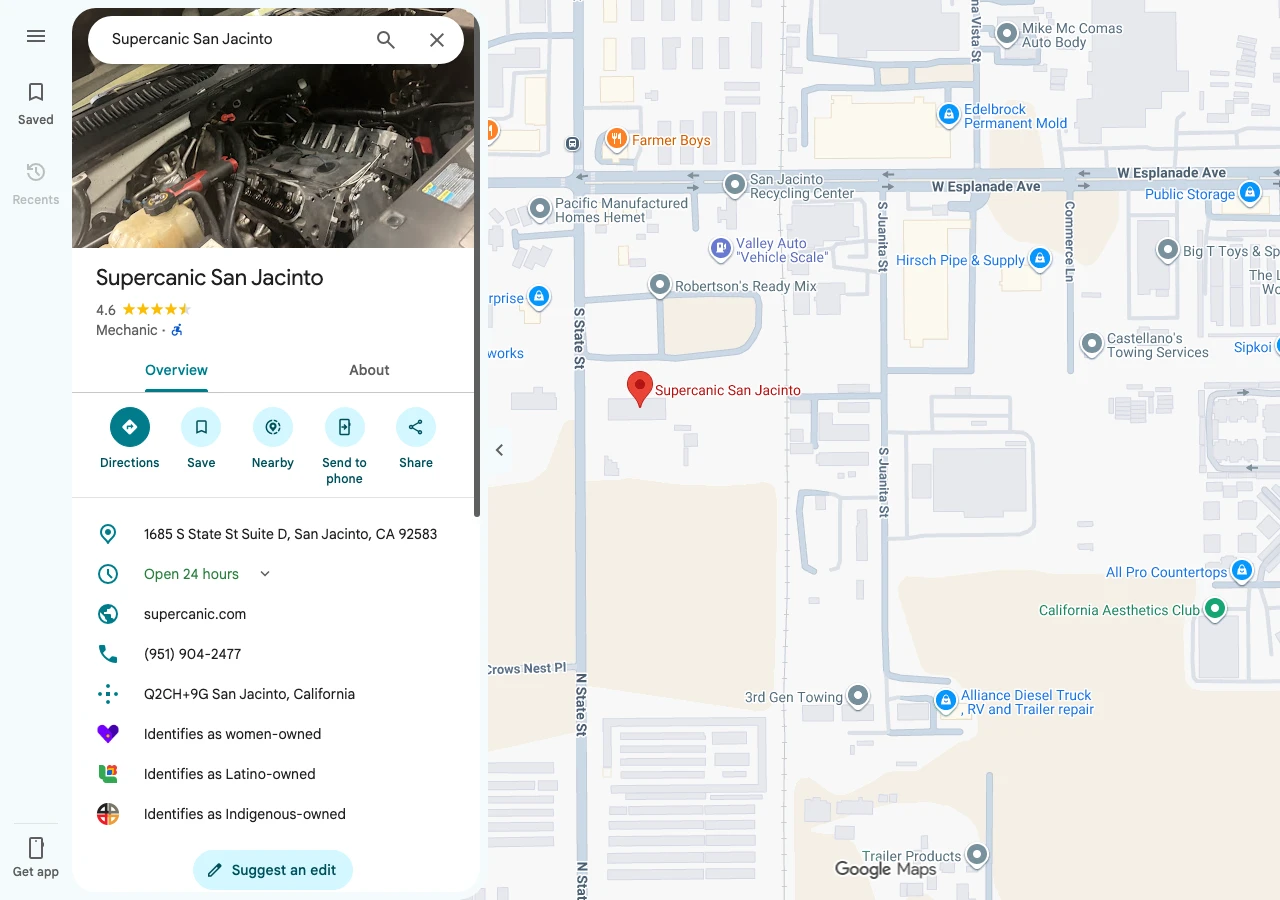
The best way to see this is one real profile. Supercanic San Jacinto is the auto repair shop Anthony Limpert runs. Its Google profile shows 4.6 stars from 117 reviews, the Mechanic category, and hours listed as open 24 hours.
In late October 2026, the same search for "mechanic" ran on Google Maps from nine points. They sat in a grid 3 miles apart, with the shop in the middle.
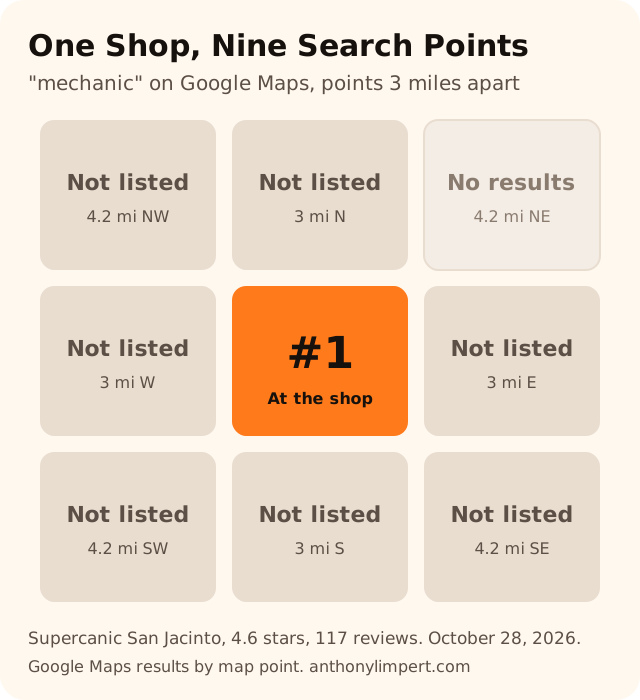
From the middle point, the shop ranked first. From every other point, it wasn't listed. One point to the northeast returned no results for anybody.
That's a profile with real reviews and a real address. It still owns about one square of nine. Two other details from the same pull matter more than the number one.
- At the shop, a chain oil change place with 626 reviews ranked 16th. A shop with 117 reviews and the Mechanic category ranked first. Reviews didn't beat category and distance.
- Three miles south, a profile with 121 reviews ranked first. Three shops with 455, 517 and 817 reviews ranked 5th, 11th and 15th. Again, closer and better matched beat bigger.
On screen, near the shop, it looks like this. Two paid ads, then the first unpaid result.
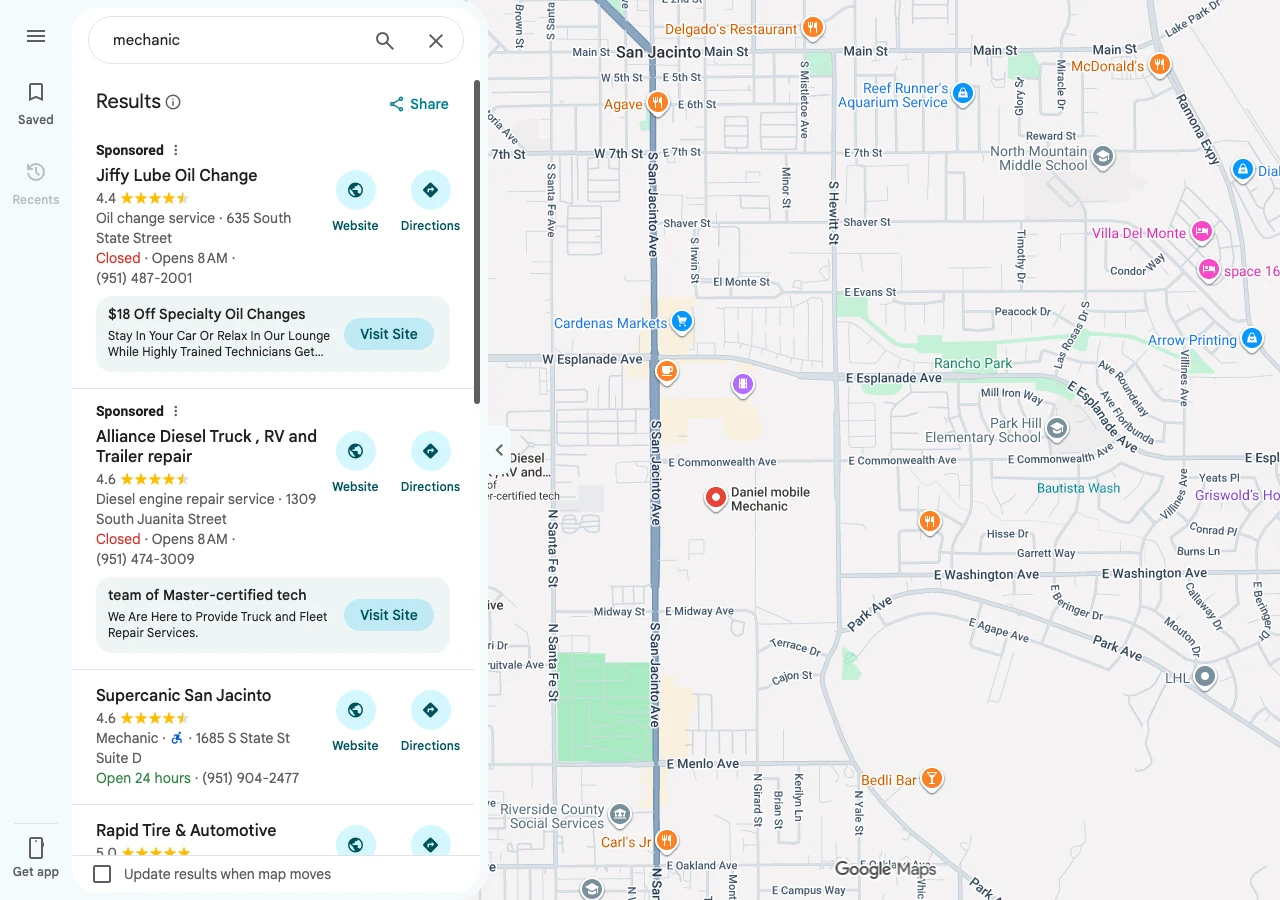
So when someone asks how to rank higher on Google Maps, the real question is "higher from where?" Run your own grid before you change anything. A rank grid tool checks many points at once. A free way is to search from a friend's phone in each part of town and write down where you show up.
What Moves You Up Inside Your Radius
These are the fixes that change your rank from the spots where you already show up. Start at the top. Each one is free.
Get the Primary Category Right
Your primary category is the single biggest thing you control. Google's guidelines say to pick as few categories as you can, choose the most specific one that fits, and describe what the business is, not what it has (Google Business Profile guidelines).
A brake shop that picks "Auto repair shop" when "Brake shop" fits better is giving up its best search. Look at what the top three in your trade use, then pick the most specific true one. The guide on how to pick your primary category walks through that check.
Be Open When People Search
"Open at the time of search" ranked fifth in the Whitespark survey (Whitespark). Google also tells owners to keep hours complete, special hours included (Google Business Profile Help).
Never fake hours to rank. A customer who drives over and finds a locked gate leaves the review that hurts. But if you really take calls or emergency jobs at night, list those hours. Set holiday hours before every holiday so Google doesn't mark you closed.
Get Reviews With Words in Them, Every Week
Google says more reviews and good ratings can help your rank (Google Business Profile Help). The survey adds two details owners miss. Its top ten names reviews with text, not star taps alone. And its experts favor a steady flow over bursts. "Too many Google reviews too fast" showed up on both its negative list and its suspension risk list (Whitespark).
Ask every customer, at pickup or payment, every day. Ask them to say what you fixed and what town they're in. You can't write the words for them, but you can ask the question that gets them. The guide on how mechanics get more Google reviews has the text to send.
Put the Pin Where the Door Is
Pin placement made the survey's top ten (Whitespark). A pin dropped on the street, or on the wrong side of a big plaza, moves your "distance" without you knowing. Open your profile, check the pin on the satellite view, and drag it onto your actual entrance.
Make Your Website Agree With Your Profile
Relevance isn't only the profile. Your website should name the same services, the same city and the same phone number. Give each main service its own page, and link your profile to the page that fits best. Add LocalBusiness schema so the facts are machine readable. The guide on schema markup for local businesses shows what to add.
How to Stretch Your Radius
This is the slow part, and it's the part that pays. Prominence is how a shop 4 miles away beats one next door.
- Earn local links. Google names links to your site as part of prominence (Google Business Profile Help). Sponsor a team, join the chamber, get a write up in the local paper. Those links come from your town, and that's the point. The local links guide lists where to get them.
- Get named in the places customers read. Local news, community groups and real directories. A mention of your name and town builds the same picture even without a link.
- Keep your name, address and phone the same everywhere. A mismatched phone on an old listing splits your signals. The post on directories and citations covers which ones are worth fixing.
- Open a real second location if the business supports it. A second staffed address gives you a second center. Never use a virtual office or mailbox for this. Google's guidelines say virtual offices aren't eligible and only real locations get a profile (Google Business Profile guidelines). The guide on local SEO with more than one location covers how to run two.
Service areas don't stretch your rank. Google lets a service area business list up to 20 areas within about 2 hours of driving. Its help page says the area helps people find you, but never says it moves your rank (Google Business Profile Help). Listing a town tells customers you go there. It doesn't put you on their map.
Don't Stuff Keywords Into Your Business Name
This one deserves its own warning, because it works. Keywords in the business name ranked third in the Whitespark survey's Maps factors. "Joe's Plumbing San Jacinto Emergency Drain Repair" often beats "Joe's Plumbing" for a while.
The same report put keyword stuffing in the business name at eighth on its suspension risk list (Whitespark). Google's guidelines say to use your real world name, the one on your sign and stationery. Don't add taglines, service descriptions or location details. Breaking that can lead to a suspended profile (Google Business Profile guidelines).
A competitor can report a stuffed name in a minute. A suspended profile disappears from Maps entirely, reviews and all. If you want the keyword in your name, change the real name. Put it on the sign, the paperwork and the website. Then it's not stuffing.
Can You Pay Google to Rank Higher on Maps?
No. Google's help page says there's no way to request or pay for a better local ranking (Google Business Profile Help). What you can buy is an ad. Those are the "Sponsored" spots above the free results in the screenshot. They stop the day you stop paying, and they don't lift your unpaid rank. The post on Local Services Ads vs Google Ads explains the two paid choices.
Anyone selling a guaranteed number one map spot is selling something Google says doesn't exist.
Why Does My Map Ranking Change When I Drive Across Town?
Because Google re-ranks every search from the searcher's spot. Google says distance is measured from the person searching. If they don't share a location, Google uses what it knows about where they are (Google Business Profile Help). The nine point test above is that rule in action. Same shop, same hour, first place in one square and missing from the rest.
That's also why a rank report with one number is close to useless for a local business. Ask for a grid, or for rank from the neighborhoods where your best customers live.
Does Having More Reviews Make You Rank Higher?
It helps, but less than owners think. Google says more reviews and positive ratings can help your local ranking (Google Business Profile Help). In the grid pull above, shops with four to seven times more reviews still ranked below a closer, better matched profile. Reviews raise you against shops at a similar distance. They rarely jump you over a shop that's closer and in the right category.
Reviews also do a second job that rank reports miss. They're what a shopper reads before calling. A shop in third place with 200 detailed reviews often gets the call over first place with 12.
Your Checklist This Week
- Search your main service from five spots in your town and write down your rank in each
- Check your primary category against the top three shops in your trade
- Remove any category that describes what you have, not what you are
- Set real hours, plus holiday hours for the next two months
- Drag your map pin onto your actual front door
- Take any extra keywords out of your business name if they aren't on your sign
- Make sure your site lists the same name, address and phone as your profile
- Ask every customer this week for a review, at pickup or payment
- Pick one local group, sponsor or news site to earn a link from this month
Want the full profile setup done in order, from category to reviews? The Google Business Profile Playbook walks through it, or work with Anthony and have it done for you.
Connected Guides
- Google Business Profile categories, how to pick your primary one
- Why your business is not showing up on Google
- How mechanics can get more Google reviews
- Local SEO for businesses with more than one location
Official Sources
- Google Business Profile Help, tips to improve your local ranking on Google
- Google Business Profile guidelines, representing your business on Google
- Google Business Profile Help, add or edit your service area
- Whitespark, 2026 Local Search Ranking Factors
Want my new posts near the top when you search? Pick Anthony Limpert as a preferred source on Google and Google shows them to you more often in Top Stories.