 Anthony
 How To Remove Bad Google Reviews From Your Business
You cannot delete a Google review from your own business. Nobody can, not you and not a paid service. What you can do is report a review that breaks one of Google's content rules, and Google removes it if it agrees. If Google says no, you get one appeal through the Reviews Management Tool. If the review is a shakedown, there is a separate extortion form. If it is a real customer who is just angry, it stays, and your job is a calm reply and a steady flow of new reviews.
I run Google Business Profiles for our own auto repair shops and for client businesses. The question I get most from owners is some version of "how do I make this one star go away." This is the straight answer, with every click, checked against Google's own help pages and the FTC's rule text in October 2026.
Know This Going In
- Google removes a review only when it breaks a policy. "Unfair" or "not true" is not enough on its own.
- Report from your profile, or use the Reviews Management Tool so you can track it.
- If the report is denied, you get a one-time appeal. Use it on your best cases.
- Extortion reviews go through their own form. Never pay.
- Offering anything to get a review changed or removed breaks Google's rules. Threatening a reviewer can break federal law.
- One bad review on a 4.5 star profile takes seven new 5 star reviews to cancel. The math is below.
What You'll Learn
You Cannot Delete It. This Is What You Can Do
Google's help page on managing reviews says it plainly. Only reviews that break Google policy can be removed. Not liking a review, or disagreeing with it, is not a reason to report it (Google Business Profile Help).
So you have five real moves, and they work in this order.
- Report it if it breaks a rule.
- Appeal it once if Google says no and you have a strong case.
- Use the extortion form if someone wants money to take reviews down.
- Use the legal route if the review is unlawful where you are, like defamation. That one needs a lawyer.
- Reply and bury it if it is a real customer. This is the move most owners need and the one most guides rush past.
Most pages on this topic sell a removal service. A service has the same buttons you do. It cannot reach inside Google. Keep that in mind when someone quotes you a price per review.
The Removal Reasons That Actually Work
Google's Maps policy for user content lists what is banned. These are the headings that matter for a business owner, mapped to the bad reviews I see most (Maps user contributed content policy).
| What the review looks like | Policy it breaks | Worth reporting? |
|---|---|---|
| Never a customer. No job, no name in your records | Fake & Misleading Content, Fake Engagement | Yes. Your best case |
| Posted by a competitor, ex employee or family member | Conflict of interest, listed under Rating Manipulation and Misrepresentation | Yes, if you can show the tie |
| A burst of one star reviews from new accounts in a day or two | Fake Engagement | Yes, report every one |
| Rant about politics, a news story or another business | Off-topic | Yes |
| Your employee's full name with insults or a phone number | Harassment, Personal information | Yes |
| Swearing or slurs | Obscenity & profanity, Hate speech | Yes |
| Same text posted again and again | Unclear and Repetitive Content | Yes |
| Selling something or linking to another business | Advertising & solicitation | Yes |
| A real customer who says you were slow, rude or too expensive | None | No. Reply instead |
| A real customer whose facts are wrong | Usually none | Rarely. Reply with the facts |
The last two rows are where owners lose. A real customer telling their side, even a side you think is wrong, is not a policy violation. Reporting it wastes your one appeal.
A note on "conflict of interest." It is not its own heading in the policy. It lives inside Rating Manipulation and Misrepresentation, and it covers ties like work, contracts, personal relationships, competitors and family. Pick the reason that fits best and say why in plain words when the form gives you room.
Build Your Case Before You Click
Google decides off what it can see. Make its job easy.
- Search your invoices, calls and texts for the reviewer's name. If there is no record, write that down with the date range you checked.
- Screenshot the review with the date showing.
- Tap the reviewer's name and screenshot their other public reviews. A brand new account that reviewed five of your competitors in one day tells a story.
- If you think a competitor or ex employee wrote it, save the proof that ties them to it.
Step by Step. Report a Review From Your Profile
This is the fast way. Google's help page lists these steps (Google Business Profile Help).
- Sign in to the Google account that manages your Business Profile.
- Go to your Business Profile.
- Select Read reviews.
- Next to the review, select the report icon.
- Choose the reason that matches the policy it breaks.
- Select Send report.
That is it. The catch is that this way gives you no easy place to track it, so I use the tool below for anything that matters.
Step by Step. Report With the Reviews Management Tool
The Reviews Management Tool is Google's own page for reporting reviews, checking where a report stands and appealing. You reach it from the same help page.
- Open the Reviews Management Tool.
- If the email shown is yours, select Confirm. If not, select Switch account.
- Select your business.
- Select Continue, then Report a new review for removal, then Continue.
- Next to the review, select Report.
- In the new tab, choose a reason.
- Select Submit.
If you are a merchant in the European Economic Area, Google says you can also report third party reviews right on Google.
How Long It Takes
Google says evaluation usually takes several days. Do not report the same review over and over in the meantime. Write the date you reported it in a simple log so you know when to check back.
How To Check the Status and Appeal
Go back to the Reviews Management Tool and pick Check the status of a review I reported previously and appeal options. Each report shows one of three statuses, per Google's help page.
| Status | What it means | Your move |
|---|---|---|
| Decision pending | Flagged, not checked yet | Wait |
| Report reviewed, no policy violation | Google checked it and found no violation | Appeal if you have proof |
| Escalated, check your email for updates | Your appeal went to a second look | Watch your email for the final answer |
The Appeal, Click by Click
- Open the Reviews Management Tool and select Confirm.
- Select your business.
- Select Continue, then Check the status of a review I reported previously and appeal options, then Continue.
- At the bottom, select Appeal eligible reviews.
- Select the reviews to appeal. Google lets you pick up to 10.
- Select Continue, then Submit an appeal.
- Fill out the form in the new tab and select Submit.
Google calls this a one-time appeal. So write it like you only get one shot, because you do. Name the policy. Give the facts in three or four short lines. "No customer by this name in our records from January 2025 to today. Account was created this week and reviewed four other shops on the same day." That beats a paragraph about how unfair it feels.
If the appeal finds a violation, Google removes the review. If not, the review stays up and Google tells you by email.
Report the Reviewer, Not Just the Review
Sometimes the problem is the account, not one review. Google's help page shows how to report a user profile from the Google Maps app.
- Open the Google Maps app.
- Tap Business at the bottom right.
- Tap Reviews.
- Tap the reviewer's name.
- At the top right, tap More, then Report.
- Pick a reason, like a legal issue or privacy concern.
Use this for an account that is clearly fake or that is going after you across several posts.
When It Is a Shakedown. Use the Extortion Form
It usually goes like this. Someone drops a pile of one and two star reviews on your profile, then texts or emails you asking for money, gift cards or free work to take them down.
Google has a help page just for this (negative review extortion scams). The rules are short.
- Do not pay and do not talk to them. Google says paying can invite more attempts and does not make sure the reviews come down.
- Save the evidence right now. Screenshots of every demand with dates, times and the sender's contact info. Links to each fake review. Any names, emails, phone numbers or social profiles. When the spike started and when the demand came.
- File the merchant extortion report form linked from that page. It asks for your contact info, your role at the business, the profile name, address and link, the reviews, how they reached you and what they asked for.
Google says it investigates and tells you the result, but it will not share details. This form is only for extortion. A plain spam review still goes through the normal report flow above.
When It Is Defamation. The Legal Route
Some reviews cross from opinion into something that may be unlawful where you are. Google runs a separate Legal Help Center for content you believe breaks the law or your rights (Report content for legal reasons).
Google says to flag the content in the product first. Then you start a request through its webform, pick the product, pick the reason, give the exact URL of the review and explain what is wrong with it. You get a reference number by email.
I am not a lawyer and this is not legal advice. Whether a review is defamation is a legal question. Talk to a lawyer in your state before you go this way, and read the next section before you send anyone a letter.
What Will Get You in Trouble
This is the part the top ranking pages skip, and it is the part that can cost you real money.
Paying or Trading To Get a Review Changed
Google's policy bans offering anything "in exchange for posting any review or revision or removal of a negative review." That covers a refund, a discount, free work or a gift card tied to the review coming down (Maps user contributed content policy).
You can make it right with an unhappy customer. You can refund them because the job was bad. What you cannot do is say "I will refund you if you delete the review." Keep the fix and the review as two separate things.
Threats and False Accusations
The FTC announced its final rule on consumer reviews on August 14, 2024, after a 5 to 0 vote. It took effect 60 days after it was published in the Federal Register, and it lets the FTC seek civil penalties against knowing violators (FTC press release).
Section 465.7 of that rule is about review suppression. It bans using an unfounded or groundless legal threat, a physical threat, intimidation or a knowingly false public accusation to stop a review or to get one removed (16 CFR 465.7).
So a scary letter you cannot back up, or a public reply calling a real customer a liar, can put you on the wrong side of a federal rule. Calm, true and short is the only safe way to answer.
Gag Clauses in Your Paperwork
The Consumer Review Fairness Act bans form contract terms that stop customers from reviewing you, fine them for a review, or take the rights to what they wrote. The FTC and state attorneys general enforce it (FTC business guidance). If your estimate, work order or website terms say "no negative reviews," take that line out this week.
Faking Reviews To Push the Bad One Down
Google's policy bans paid reviews, reviews from several accounts at one person's request, asking only happy customers for reviews, and staff review quotas. If Google finds fake engagement on your profile, its help page says it can stop new reviews for a period of time, unpublish your existing reviews for a period of time, or show a warning to customers that fake reviews were removed (Business Profile restrictions). That is far worse than one bad review.
The Math. How Many 5 Star Reviews Cancel a 1 Star
People search this exact question, so the real answer follows. To get back to the average you had before one bad review, you need this many new 5 star reviews.
New 5 star reviews needed = (your average minus 1) divided by (5 minus your average)
It does not matter how many reviews you have. Here it is worked out.
| Your average before the 1 star | 5 star reviews to get it back |
|---|---|
| 4.0 | 3 |
| 4.3 | 5 (4.7, rounded up) |
| 4.5 | 7 |
| 4.7 | 13 (12.3, rounded up) |
| 4.8 | 19 |
| 4.9 | 39 |
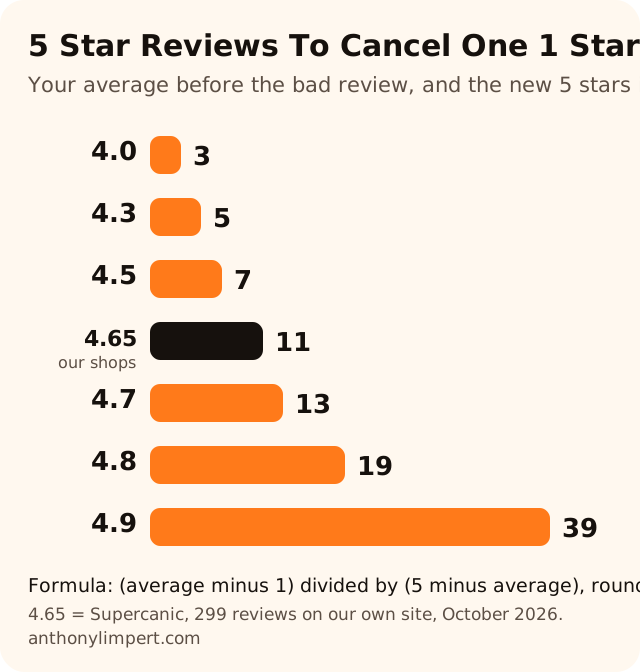
The higher your rating, the more a single one star costs you. That is why the businesses with the best ratings are the ones who ask every single customer.
Our own case shows it. Supercanic, the auto repair company I started with Alaina Limpert, shows 299 reviews averaging about 4.65 across five locations on our own website as of October 17, 2026. That is our own count from the five location ratings on our site. One more one star review would pull that to about 4.64. Getting back takes 11 new five star reviews. That is a week or two of asking every customer at our volume, not a crisis. The size of your review base is your shock absorber.
How To Reply to a Bad Review You Cannot Remove
Most bad reviews stay up. So the reply matters more than the report.

Google's help page on replies has a few facts every owner should know (Read and reply to reviews).
- Your profile must be verified before you can reply.
- Google checks your reply against its policies. It usually takes up to 10 minutes and can take up to 30 days.
- The reviewer gets a notice when you reply, and they can still change their review after that.
- You can edit or delete your reply later.
That third point matters most. A good reply is the most common way a one star turns into a three or a five, because the customer sees it.
My Reply Formula
Write to the next hundred people who read it, not to the reviewer.
- Thank them by name. One line.
- Own what is yours. "You waited too long for a callback. That is on us."
- Correct facts only if you must, and only calmly. No private details about the job or the customer.
- Take it offline. Give a name and a phone number.
- Stop. Four or five sentences. Long replies read like a fight.
I would post something like this.
Thanks for the feedback, Mike. You should have had a call back the same day and you did not. That is on us. I would like to make it right. Please call me at the shop and ask for Anthony.
Never argue in public. Never post their invoice, their address or what they paid. Never call them a liar, even when they are wrong.
Can You Ask Them To Change It?
Yes, if you ask once, with nothing attached. Fix the problem first. Then, if they are happy, it is fine to say "If you feel differently now, you can update your review anytime." No refund tied to it, no discount, no pressure. If they say no, let it go.
Should You Pay a Removal Service?
My take. A removal service uses the same report flow, the same one-time appeal and the same legal form you can use for free. Some do the paperwork well. None can remove a real customer's genuine review, and any service that promises it is either guessing or breaking a rule for you.
If you pay one, pay only on removal, never pay up front, and ask exactly what reason they plan to report under. If the answer is vague, keep your money.
Your time is better spent on the thing a service cannot do for you, which is getting fresh, real reviews every week. My Google Business Profile Playbook covers the review ask, the reply habit and the rest of the profile that wins the map.
Want my new posts near the top when you search? Pick Anthony Limpert as a preferred source on Google and Google shows them to you more often in Top Stories.
Ask the Shop
Can a business owner delete a Google review?
No. There is no delete button for the owner. You can report a review that breaks Google's policies, and Google removes it if it agrees. You can also delete your own reply.
How long does Google take to remove a reported review?
Google's help page says evaluation usually takes several days. Check the status in the Reviews Management Tool. If it says no policy violation, you can file a one-time appeal.
Why are so many Google reviews being removed?
Google's automated spam detection removes reviews it thinks break policy, and Google says it can occasionally remove real ones too. If a real customer's review vanished, Google's help page points you to contact support.
What companies can remove bad Google reviews?
Only Google can remove a review. Services can file the reports and appeals for you, but they use the same tools you have. None can remove a genuine review from a real customer.
Can a bad Google review be traced?
Your profile shows only the name and public profile the reviewer chose. Tap their name to see their other public reviews. Getting more than that is a legal process, so talk to a lawyer.
Can I offer a refund if the customer removes the review?
No. Google bans offering anything in exchange for a review being changed or removed. You can refund a bad job. Just never tie the refund to the review.
Can I sue someone for a bad Google review?
That is a question for a lawyer in your state. Know this before you threaten anyone. The FTC's review rule bans groundless legal threats and intimidation used to get a review removed.
What do I do if someone demands money to remove fake reviews?
Do not pay or reply. Screenshot every message, save links to the reviews, and file Google's merchant extortion report form from its help page on review extortion scams.
Your Checklist This Week
- Read every one star and two star review and sort them into "breaks a rule" and "real customer"
- Check your records for each "breaks a rule" reviewer and screenshot what you find
- Report each one through the Reviews Management Tool and log the date
- Save the appeal for your strongest case with real proof
- Reply to every real customer review with the five step formula
- Take any "no negative reviews" line out of your estimates and website terms
- Send your review link to every customer from last week, happy or not, with nothing attached
If bad reviews are hurting your calls and you want a second set of eyes on the profile, see how I work with businesses or book a strategy call.
Official Sources
- Google Business Profile Help, manage customer reviews (report, Reviews Management Tool, appeal)
- Google Maps user contributed content policy
- Google Business Profile Help, read and reply to reviews
- Google Business Profile Help, negative review extortion scams
- Google Business Profile Help, restrictions for policy violations
- Google Legal Help, report content for legal reasons
- FTC, final rule banning fake reviews and testimonials, August 14, 2024
- 16 CFR 465.7, review suppression
- FTC, Consumer Review Fairness Act, what businesses need to know